Sunday, October 16, 2022

Postgres: Steps to create /pg* mountpoints - prereqs for postgres setup

Objective: 

Create /pgBIN, /pgDATA, /pgWAL, /pgBACKUP mountpoints in preperation for postgres installation.

>>> Report the disks assigned:

We assigned 1 disk of size 20G to this vm.

[root@10 ~]# fdisk -l
Disk /dev/sda: 10.7 GB, 10737418240 bytes, 20971520 sectors
Units = sectors of 1 * 512 = 512 bytes
Sector size (logical/physical): 512 bytes / 512 bytes
I/O size (minimum/optimal): 512 bytes / 512 bytes
Disk label type: dos
Disk identifier: 0x000b7b30
   Device Boot      Start         End      Blocks   Id  System
/dev/sda1   *        2048     2099199     1048576   83  Linux
/dev/sda2         2099200    20971519     9436160   8e  Linux LVM
Disk /dev/sdb: 4294 MB, 4294967296 bytes, 8388608 sectors
Units = sectors of 1 * 512 = 512 bytes
Sector size (logical/physical): 512 bytes / 512 bytes
I/O size (minimum/optimal): 512 bytes / 512 bytes
Disk label type: dos
Disk identifier: 0x626472a8
   Device Boot      Start         End      Blocks   Id  System
/dev/sdb1            2048     8388607     4193280   8e  Linux LVM
Disk /dev/sdc: 21.5 GB, 21474836480 bytes, 41943040 sectors
Units = sectors of 1 * 512 = 512 bytes
Sector size (logical/physical): 512 bytes / 512 bytes
I/O size (minimum/optimal): 512 bytes / 512 bytes

Disk /dev/mapper/centos-root: 8585 MB, 8585740288 bytes, 16769024 sectors
Units = sectors of 1 * 512 = 512 bytes
Sector size (logical/physical): 512 bytes / 512 bytes
I/O size (minimum/optimal): 512 bytes / 512 bytes

Disk /dev/mapper/centos-swap: 1073 MB, 1073741824 bytes, 2097152 sectors
Units = sectors of 1 * 512 = 512 bytes
Sector size (logical/physical): 512 bytes / 512 bytes
I/O size (minimum/optimal): 512 bytes / 512 bytes

Disk /dev/mapper/ostmpswpvg-ostmpswpvg--tmp00: 2097 MB, 2097152000 bytes, 4096000 sectors
Units = sectors of 1 * 512 = 512 bytes
Sector size (logical/physical): 512 bytes / 512 bytes
I/O size (minimum/optimal): 512 bytes / 512 bytes

Disk /dev/mapper/ostmpswpvg-ostmpswpvg--swp00: 2097 MB, 2097152000 bytes, 4096000 sectors
Units = sectors of 1 * 512 = 512 bytes
Sector size (logical/physical): 512 bytes / 512 bytes
I/O size (minimum/optimal): 512 bytes / 512 bytes

>>> Format the disk

[root@10 ~]# fdisk /dev/sdc
Welcome to fdisk (util-linux 2.23.2).
Changes will remain in memory only, until you decide to write them.
Be careful before using the write command.
Device does not contain a recognized partition table
Building a new DOS disklabel with disk identifier 0x273cc6b3.
Command (m for help): n
Partition type:
   p   primary (0 primary, 0 extended, 4 free)
   e   extended
Select (default p): p
Partition number (1-4, default 1):
First sector (2048-41943039, default 2048):
Using default value 2048
Last sector, +sectors or +size{K,M,G} (2048-41943039, default 41943039):
Using default value 41943039
Partition 1 of type Linux and of size 20 GiB is set
Command (m for help): t
Selected partition 1
Hex code (type L to list all codes): 8e
Changed type of partition 'Linux' to 'Linux LVM'
Command (m for help): w
The partition table has been altered!
Calling ioctl() to re-read partition table.
Syncing disks.
[root@10 ~]# fdisk -l
Disk /dev/sda: 10.7 GB, 10737418240 bytes, 20971520 sectors
Units = sectors of 1 * 512 = 512 bytes
Sector size (logical/physical): 512 bytes / 512 bytes
I/O size (minimum/optimal): 512 bytes / 512 bytes
Disk label type: dos
Disk identifier: 0x000b7b30
   Device Boot      Start         End      Blocks   Id  System
/dev/sda1   *        2048     2099199     1048576   83  Linux
/dev/sda2         2099200    20971519     9436160   8e  Linux LVM
Disk /dev/sdb: 4294 MB, 4294967296 bytes, 8388608 sectors
Units = sectors of 1 * 512 = 512 bytes
Sector size (logical/physical): 512 bytes / 512 bytes
I/O size (minimum/optimal): 512 bytes / 512 bytes
Disk label type: dos
Disk identifier: 0x626472a8
   Device Boot      Start         End      Blocks   Id  System
/dev/sdb1            2048     8388607     4193280   8e  Linux LVM
Disk /dev/sdc: 21.5 GB, 21474836480 bytes, 41943040 sectors
Units = sectors of 1 * 512 = 512 bytes
Sector size (logical/physical): 512 bytes / 512 bytes
I/O size (minimum/optimal): 512 bytes / 512 bytes
Disk label type: dos
Disk identifier: 0x273cc6b3
   Device Boot      Start         End      Blocks   Id  System
/dev/sdc1            2048    41943039    20970496   8e  Linux LVM
Disk /dev/mapper/centos-root: 8585 MB, 8585740288 bytes, 16769024 sectors
Units = sectors of 1 * 512 = 512 bytes
Sector size (logical/physical): 512 bytes / 512 bytes
I/O size (minimum/optimal): 512 bytes / 512 bytes

Disk /dev/mapper/centos-swap: 1073 MB, 1073741824 bytes, 2097152 sectors
Units = sectors of 1 * 512 = 512 bytes
Sector size (logical/physical): 512 bytes / 512 bytes
I/O size (minimum/optimal): 512 bytes / 512 bytes

Disk /dev/mapper/ostmpswpvg-ostmpswpvg--tmp00: 2097 MB, 2097152000 bytes, 4096000 sectors
Units = sectors of 1 * 512 = 512 bytes
Sector size (logical/physical): 512 bytes / 512 bytes
I/O size (minimum/optimal): 512 bytes / 512 bytes

Disk /dev/mapper/ostmpswpvg-ostmpswpvg--swp00: 2097 MB, 2097152000 bytes, 4096000 sectors
Units = sectors of 1 * 512 = 512 bytes
Sector size (logical/physical): 512 bytes / 512 bytes
I/O size (minimum/optimal): 512 bytes / 512 bytes

>>> Report the physical volumes

[root@10 ~]# pvdisplay
  --- Physical volume ---
  PV Name               /dev/sda2
  VG Name               centos
  PV Size               <9.00 GiB / not usable 3.00 MiB
  Allocatable           yes (but full)
  PE Size               4.00 MiB
  Total PE              2303
  Free PE               0
  Allocated PE          2303
  PV UUID               g4bogw-Jcoc-2zu7-RIqV-r1nQ-3jZ2-gL6sod
  --- Physical volume ---
  PV Name               /dev/sdb1
  VG Name               ostmpswpvg
  PV Size               <4.00 GiB / not usable 3.00 MiB
  Allocatable           yes
  PE Size               4.00 MiB
  Total PE              1023
  Free PE               23
  Allocated PE          1000
  PV UUID               mkrsFQ-FmN6-wWEb-vavK-7y1A-GwNv-rIph7K

>>> Create the physical volume

[root@10 ~]# pvcreate /dev/sdc1
  Physical volume "/dev/sdc1" successfully created.
  

>>> Display the pvs created

[root@10 ~]# pvdisplay
  --- Physical volume ---
  PV Name               /dev/sda2
  VG Name               centos
  PV Size               <9.00 GiB / not usable 3.00 MiB
  Allocatable           yes (but full)
  PE Size               4.00 MiB
  Total PE              2303
  Free PE               0
  Allocated PE          2303
  PV UUID               g4bogw-Jcoc-2zu7-RIqV-r1nQ-3jZ2-gL6sod
  --- Physical volume ---
  PV Name               /dev/sdb1
  VG Name               ostmpswpvg
  PV Size               <4.00 GiB / not usable 3.00 MiB
  Allocatable           yes
  PE Size               4.00 MiB
  Total PE              1023
  Free PE               23
  Allocated PE          1000
  PV UUID               mkrsFQ-FmN6-wWEb-vavK-7y1A-GwNv-rIph7K
  "/dev/sdc1" is a new physical volume of "<20.00 GiB"
  --- NEW Physical volume ---
  PV Name               /dev/sdc1
  VG Name
  PV Size               <20.00 GiB
  Allocatable           NO
  PE Size               0
  Total PE              0
  Free PE               0
  Allocated PE          0
  PV UUID               YwGcDe-ITKp-toeF-2MRr-wjNJ-DZ8F-iNYyux

>>> Create the necessary vg

[root@10 ~]# vgcreate appvg /dev/sdc1
  Volume group "appvg" successfully created
  

>>> Display the vg

[root@10 ~]# vgdisplay
  --- Volume group ---
  VG Name               appvg
  System ID
  Format                lvm2
  Metadata Areas        1
  Metadata Sequence No  1
  VG Access             read/write
  VG Status             resizable
  MAX LV                0
  Cur LV                0
  Open LV               0
  Max PV                0
  Cur PV                1
  Act PV                1
  VG Size               <20.00 GiB
  PE Size               4.00 MiB
  Total PE              5119
  Alloc PE / Size       0 / 0
  Free  PE / Size       5119 / <20.00 GiB
  VG UUID               z7yXoU-EZxo-tffH-8vaK-1BNk-YfjN-jJ1VY9
  --- Volume group ---
  VG Name               centos
  System ID
  Format                lvm2
  Metadata Areas        1
  Metadata Sequence No  3
  VG Access             read/write
  VG Status             resizable
  MAX LV                0
  Cur LV                2
  Open LV               1
  Max PV                0
  Cur PV                1
  Act PV                1
  VG Size               <9.00 GiB
  PE Size               4.00 MiB
  Total PE              2303
  Alloc PE / Size       2303 / <9.00 GiB
  Free  PE / Size       0 / 0
  VG UUID               mjXQXu-MLRw-QpAj-sOcH-Xn8X-w4WX-xLl7a0
  --- Volume group ---
  VG Name               ostmpswpvg
  System ID
  Format                lvm2
  Metadata Areas        1
  Metadata Sequence No  3
  VG Access             read/write
  VG Status             resizable
  MAX LV                0
  Cur LV                2
  Open LV               2
  Max PV                0
  Cur PV                1
  Act PV                1
  VG Size               <4.00 GiB
  PE Size               4.00 MiB
  Total PE              1023
  Alloc PE / Size       1000 / <3.91 GiB
  Free  PE / Size       23 / 92.00 MiB
  VG UUID               KfLEOe-luOc-XQw3-iJFC-zDWs-V8ST-nnZfew

>>> Activate the vg

[root@10 ~]# vgchange -a y appvg
  0 logical volume(s) in volume group "appvg" now active
>>> Create necessary logical volumes (lvs):  
[root@10 ~]# lvcreate -L 4000 appvg -n appvg-pgbin00
  Logical volume "appvg-pgbin00" created.
[root@10 ~]# lvcreate -L 4000 appvg -n appvg-pgdata00
  Logical volume "appvg-pgdata00" created.
[root@10 ~]# lvcreate -L 2000 appvg -n appvg-pgwal00
  Logical volume "appvg-pgwal00" created.
[root@10 ~]# lvcreate -L 6000 appvg -n appvg-pgbackup00
  Logical volume "appvg-pgbackup00" created.

>>> Report the lvs:

[root@10 ~]# lvdisplay
  --- Logical volume ---
  LV Path                /dev/appvg/appvg-pgbin00
  LV Name                appvg-pgbin00
  VG Name                appvg
  LV UUID                bSqUE3-x1Gc-df4k-rv2t-emmp-VE2L-V2feou
  LV Write Access        read/write
  LV Creation host, time 10.0.2.4, 2022-10-16 21:22:27 +0530
  LV Status              available
  # open                 0
  LV Size                <3.91 GiB
  Current LE             1000
  Segments               1
  Allocation             inherit
  Read ahead sectors     auto
  - currently set to     8192
  Block device           253:4
  --- Logical volume ---
  LV Path                /dev/appvg/appvg-pgdata00
  LV Name                appvg-pgdata00
  VG Name                appvg
  LV UUID                Mt6ZCm-2N42-pXMQ-Eb7e-wHmT-igYW-oXF5K8
  LV Write Access        read/write
  LV Creation host, time 10.0.2.4, 2022-10-16 21:22:37 +0530
  LV Status              available
  # open                 0
  LV Size                <3.91 GiB
  Current LE             1000
  Segments               1
  Allocation             inherit
  Read ahead sectors     auto
  - currently set to     8192
  Block device           253:5
  --- Logical volume ---
  LV Path                /dev/appvg/appvg-pgwal00
  LV Name                appvg-pgwal00
  VG Name                appvg
  LV UUID                Myenhr-8dC1-D0sj-85GK-HibR-P8P0-oZdc3R
  LV Write Access        read/write
  LV Creation host, time 10.0.2.4, 2022-10-16 21:22:53 +0530
  LV Status              available
  # open                 0
  LV Size                1.95 GiB
  Current LE             500
  Segments               1
  Allocation             inherit
  Read ahead sectors     auto
  - currently set to     8192
  Block device           253:6
  --- Logical volume ---
  LV Path                /dev/appvg/appvg-pgbackup00
  LV Name                appvg-pgbackup00
  VG Name                appvg
  LV UUID                01SNiI-wEZh-R7ne-Ji22-GQrA-qnEQ-CWvlIJ
  LV Write Access        read/write
  LV Creation host, time 10.0.2.4, 2022-10-16 21:23:07 +0530
  LV Status              available
  # open                 0
  LV Size                <5.86 GiB
  Current LE             1500
  Segments               1
  Allocation             inherit
  Read ahead sectors     auto
  - currently set to     8192
  Block device           253:7
  --- Logical volume ---
  LV Path                /dev/centos/swap
  LV Name                swap
  VG Name                centos
  LV UUID                R7ItvU-RZST-gGIh-PwJW-jukf-27Nl-c62eDf
  LV Write Access        read/write
  LV Creation host, time localhost, 2022-10-14 11:18:28 +0530
  LV Status              available
  # open                 0
  LV Size                1.00 GiB
  Current LE             256
  Segments               1
  Allocation             inherit
  Read ahead sectors     auto
  - currently set to     8192
  Block device           253:1
  --- Logical volume ---
  LV Path                /dev/centos/root
  LV Name                root
  VG Name                centos
  LV UUID                F7ESm7-w49Z-PhZS-ydAy-otg4-3PzY-hvAurG
  LV Write Access        read/write
  LV Creation host, time localhost, 2022-10-14 11:18:30 +0530
  LV Status              available
  # open                 1
  LV Size                <8.00 GiB
  Current LE             2047
  Segments               1
  Allocation             inherit
  Read ahead sectors     auto
  - currently set to     8192
  Block device           253:0
  --- Logical volume ---
  LV Path                /dev/ostmpswpvg/ostmpswpvg-tmp00
  LV Name                ostmpswpvg-tmp00
  VG Name                ostmpswpvg
  LV UUID                sqdk8r-dxfH-BR4l-5UvA-Nq4m-jv9q-kjKf22
  LV Write Access        read/write
  LV Creation host, time 10.0.2.4, 2022-10-16 18:37:26 +0530
  LV Status              available
  # open                 1
  LV Size                1.95 GiB
  Current LE             500
  Segments               1
  Allocation             inherit
  Read ahead sectors     auto
  - currently set to     8192
  Block device           253:2
  --- Logical volume ---
  LV Path                /dev/ostmpswpvg/ostmpswpvg-swp00
  LV Name                ostmpswpvg-swp00
  VG Name                ostmpswpvg
  LV UUID                a2eAP1-Ie07-5EmQ-Rfkg-qDl1-SmSc-n6Lq9m
  LV Write Access        read/write
  LV Creation host, time 10.0.2.4, 2022-10-16 18:38:06 +0530
  LV Status              available
  # open                 2
  LV Size                1.95 GiB
  Current LE             500
  Segments               1
  Allocation             inherit
  Read ahead sectors     auto
  - currently set to     8192
  Block device           253:3

>>> Format the lvs created with the filesystem format of interest


[root@10 ~]# mkfs.xfs /dev/appvg/appvg-pgbin00
meta-data=/dev/appvg/appvg-pgbin00 isize=512    agcount=4, agsize=256000 blks
         =                       sectsz=512   attr=2, projid32bit=1
         =                       crc=1        finobt=0, sparse=0
data     =                       bsize=4096   blocks=1024000, imaxpct=25
         =                       sunit=0      swidth=0 blks
naming   =version 2              bsize=4096   ascii-ci=0 ftype=1
log      =internal log           bsize=4096   blocks=2560, version=2
         =                       sectsz=512   sunit=0 blks, lazy-count=1
realtime =none                   extsz=4096   blocks=0, rtextents=0
[root@10 ~]# lvdisplay|grep "LV Path"
  LV Path                /dev/appvg/appvg-pgbin00
  LV Path                /dev/appvg/appvg-pgdata00
  LV Path                /dev/appvg/appvg-pgwal00
  LV Path                /dev/appvg/appvg-pgbackup00
  LV Path                /dev/centos/swap
  LV Path                /dev/centos/root
  LV Path                /dev/ostmpswpvg/ostmpswpvg-tmp00
  LV Path                /dev/ostmpswpvg/ostmpswpvg-swp00
[root@10 ~]# mkfs.xfs /dev/appvg/appvg-pgdata00
meta-data=/dev/appvg/appvg-pgdata00 isize=512    agcount=4, agsize=256000 blks
         =                       sectsz=512   attr=2, projid32bit=1
         =                       crc=1        finobt=0, sparse=0
data     =                       bsize=4096   blocks=1024000, imaxpct=25
         =                       sunit=0      swidth=0 blks
naming   =version 2              bsize=4096   ascii-ci=0 ftype=1
log      =internal log           bsize=4096   blocks=2560, version=2
         =                       sectsz=512   sunit=0 blks, lazy-count=1
realtime =none                   extsz=4096   blocks=0, rtextents=0
[root@10 ~]# mkfs.xfs /dev/appvg/appvg-pgwal00
meta-data=/dev/appvg/appvg-pgwal00 isize=512    agcount=4, agsize=128000 blks
         =                       sectsz=512   attr=2, projid32bit=1
         =                       crc=1        finobt=0, sparse=0
data     =                       bsize=4096   blocks=512000, imaxpct=25
         =                       sunit=0      swidth=0 blks
naming   =version 2              bsize=4096   ascii-ci=0 ftype=1
log      =internal log           bsize=4096   blocks=2560, version=2
         =                       sectsz=512   sunit=0 blks, lazy-count=1
realtime =none                   extsz=4096   blocks=0, rtextents=0
[root@10 ~]# mkfs.xfs /dev/appvg/appvg-pgbackup00
meta-data=/dev/appvg/appvg-pgbackup00 isize=512    agcount=4, agsize=384000 blks
         =                       sectsz=512   attr=2, projid32bit=1
         =                       crc=1        finobt=0, sparse=0
data     =                       bsize=4096   blocks=1536000, imaxpct=25
         =                       sunit=0      swidth=0 blks
naming   =version 2              bsize=4096   ascii-ci=0 ftype=1
log      =internal log           bsize=4096   blocks=2560, version=2
         =                       sectsz=512   sunit=0 blks, lazy-count=1
realtime =none                   extsz=4096   blocks=0, rtextents=0

>>> Backup & make /etc/fstab entry

[root@10 ~]# cat /etc/fstab
#
# /etc/fstab
# Created by anaconda on Fri Oct 14 11:18:35 2022
#
# Accessible filesystems, by reference, are maintained under '/dev/disk'
# See man pages fstab(5), findfs(8), mount(8) and/or blkid(8) for more info
#
/dev/mapper/centos-root /                       xfs     defaults        0 0
UUID=101a1074-920c-4d4f-9fcb-8164fa5728f6 /boot                   xfs     defaults        0 0
#/dev/mapper/centos-swap swap                    swap    defaults        0 0
/dev/ostmpswpvg/ostmpswpvg-swp00 swap                    swap    defaults        0 0
/dev/ostmpswpvg/ostmpswpvg-tmp00 /tmp           ext3    defaults,nodev,nosuid,noexec        1 2

[root@10 ~]# cp /etc/fstab /etc/fstab_bkp_16oct2022_prepgentry

[root@10 ~]# vi /etc/fstab

[root@10 ~]# cat /etc/fstab
#
# /etc/fstab
# Created by anaconda on Fri Oct 14 11:18:35 2022
#
# Accessible filesystems, by reference, are maintained under '/dev/disk'
# See man pages fstab(5), findfs(8), mount(8) and/or blkid(8) for more info
#
/dev/mapper/centos-root /                       xfs     defaults        0 0
UUID=101a1074-920c-4d4f-9fcb-8164fa5728f6 /boot                   xfs     defaults        0 0
#/dev/mapper/centos-swap swap                    swap    defaults        0 0
/dev/ostmpswpvg/ostmpswpvg-swp00 swap                    swap    defaults        0 0
/dev/ostmpswpvg/ostmpswpvg-tmp00 /tmp           ext3    defaults,nodev,nosuid,noexec        1 2
/dev/appvg/appvg-pgbin00 /pgBIN                  xfs     defaults        0 0
/dev/appvg/appvg-pgdata00 /pgDATA                xfs     defaults        0 0
/dev/appvg/appvg-pgwal00 /pgWAL                  xfs     defaults        0 0
/dev/appvg/appvg-pgbackup00 /pgBACKUP            xfs     defaults        0 0

>>> Report the mountpoint info:

[root@10 ~]# df -h
Filesystem                                Size  Used Avail Use% Mounted on
devtmpfs                                  484M     0  484M   0% /dev
tmpfs                                     496M     0  496M   0% /dev/shm
tmpfs                                     496M  6.8M  489M   2% /run
tmpfs                                     496M     0  496M   0% /sys/fs/cgroup
/dev/mapper/centos-root                   8.0G  1.8G  6.3G  22% /
/dev/sda1                                1014M  170M  845M  17% /boot
tmpfs                                     100M     0  100M   0% /run/user/0
/dev/mapper/ostmpswpvg-ostmpswpvg--tmp00  1.9G  3.0M  1.8G   1% /tmp

>>> Create the necessary directories:

[root@10 ~]# mkdir /pgBIN /pgDATA /pgWAL /pgBACKUP
[root@10 ~]# df -h
Filesystem                                Size  Used Avail Use% Mounted on
devtmpfs                                  484M     0  484M   0% /dev
tmpfs                                     496M     0  496M   0% /dev/shm
tmpfs                                     496M  6.8M  489M   2% /run
tmpfs                                     496M     0  496M   0% /sys/fs/cgroup
/dev/mapper/centos-root                   8.0G  1.8G  6.3G  22% /
/dev/sda1                                1014M  170M  845M  17% /boot
tmpfs                                     100M     0  100M   0% /run/user/0
/dev/mapper/ostmpswpvg-ostmpswpvg--tmp00  1.9G  3.0M  1.8G   1% /tmp

>>> Try mount the mountpoints we targetted:

[root@10 ~]# mount /pgBIN
[root@10 ~]# df -h
Filesystem                                Size  Used Avail Use% Mounted on
devtmpfs                                  484M     0  484M   0% /dev
tmpfs                                     496M     0  496M   0% /dev/shm
tmpfs                                     496M  6.8M  489M   2% /run
tmpfs                                     496M     0  496M   0% /sys/fs/cgroup
/dev/mapper/centos-root                   8.0G  1.8G  6.3G  22% /
/dev/sda1                                1014M  170M  845M  17% /boot
tmpfs                                     100M     0  100M   0% /run/user/0
/dev/mapper/ostmpswpvg-ostmpswpvg--tmp00  1.9G  3.0M  1.8G   1% /tmp
/dev/mapper/appvg-appvg--pgbin00          3.9G   33M  3.9G   1% /pgBIN
[root@10 ~]# mount /pgDATA
[root@10 ~]# mount /pgWAL
[root@10 ~]# mount /pgBACKUP

>>> Report the mountpoints:

[root@10 ~]# df -h
Filesystem                                Size  Used Avail Use% Mounted on
devtmpfs                                  484M     0  484M   0% /dev
tmpfs                                     496M     0  496M   0% /dev/shm
tmpfs                                     496M  6.8M  489M   2% /run
tmpfs                                     496M     0  496M   0% /sys/fs/cgroup
/dev/mapper/centos-root                   8.0G  1.8G  6.3G  22% /
/dev/sda1                                1014M  170M  845M  17% /boot
tmpfs                                     100M     0  100M   0% /run/user/0
/dev/mapper/ostmpswpvg-ostmpswpvg--tmp00  1.9G  3.0M  1.8G   1% /tmp
/dev/mapper/appvg-appvg--pgbin00          3.9G   33M  3.9G   1% /pgBIN
/dev/mapper/appvg-appvg--pgdata00         3.9G   33M  3.9G   1% /pgDATA
/dev/mapper/appvg-appvg--pgwal00          2.0G   33M  2.0G   2% /pgWAL
/dev/mapper/appvg-appvg--pgbackup00       5.9G   33M  5.9G   1% /pgBACKUP

>>> Done, we have necessary mountpoints available now.

Thanks

Linux: Setup /tmp and swap fs using logical volume (lvs)

Objective: Setup /tmp and swap using a lvg


Additional details: Part of this exercise, we have assigned a disk named 14Oct2022_Centos_79_tmpnswap01.vdi (after increasing the sata ports needed).

Refer to Url: 

https://docs.oracle.com/cd/E18476_01/doc.220/e25258/GUID-0C1EF990-1EA7-426D-9208-083D07FF249D.htm

By default centos 7.x creates  a pv & lvg for root fs and swap fs.

>>> List disks available:

[root@10 ~]# fdisk -l
Disk /dev/sda: 10.7 GB, 10737418240 bytes, 20971520 sectors
Units = sectors of 1 * 512 = 512 bytes
Sector size (logical/physical): 512 bytes / 512 bytes
I/O size (minimum/optimal): 512 bytes / 512 bytes
Disk label type: dos
Disk identifier: 0x000b7b30
   Device Boot      Start         End      Blocks   Id  System
/dev/sda1   *        2048     2099199     1048576   83  Linux
/dev/sda2         2099200    20971519     9436160   8e  Linux LVM
Disk /dev/sdb: 4294 MB, 4294967296 bytes, 8388608 sectors <<<< new disk we alloacted for tmp and swap
Units = sectors of 1 * 512 = 512 bytes
Sector size (logical/physical): 512 bytes / 512 bytes
I/O size (minimum/optimal): 512 bytes / 512 bytes

Disk /dev/sdc: 21.5 GB, 21474836480 bytes, 41943040 sectors <<<< new disk we allocated for pg* mountpoints.
Units = sectors of 1 * 512 = 512 bytes
Sector size (logical/physical): 512 bytes / 512 bytes
I/O size (minimum/optimal): 512 bytes / 512 bytes

Disk /dev/mapper/centos-root: 8585 MB, 8585740288 bytes, 16769024 sectors
Units = sectors of 1 * 512 = 512 bytes
Sector size (logical/physical): 512 bytes / 512 bytes
I/O size (minimum/optimal): 512 bytes / 512 bytes

Disk /dev/mapper/centos-swap: 1073 MB, 1073741824 bytes, 2097152 sectors
Units = sectors of 1 * 512 = 512 bytes
Sector size (logical/physical): 512 bytes / 512 bytes
I/O size (minimum/optimal): 512 bytes / 512 bytes

>>> Let us now create a pv and lvgs needed for /tmp and swap fs.
>>> Partition the disk:
[root@10 ~]# fdisk /dev/sdb
Welcome to fdisk (util-linux 2.23.2).
Changes will remain in memory only, until you decide to write them.
Be careful before using the write command.
Device does not contain a recognized partition table
Building a new DOS disklabel with disk identifier 0x626472a8.
Command (m for help): n
Partition type:
   p   primary (0 primary, 0 extended, 4 free)
   e   extended
Select (default p): p
Partition number (1-4, default 1): 1
First sector (2048-8388607, default 2048):
Using default value 2048
Last sector, +sectors or +size{K,M,G} (2048-8388607, default 8388607):
Using default value 8388607
Partition 1 of type Linux and of size 4 GiB is set
Command (m for help): m
Command action
   a   toggle a bootable flag
   b   edit bsd disklabel
   c   toggle the dos compatibility flag
   d   delete a partition
   g   create a new empty GPT partition table
   G   create an IRIX (SGI) partition table
   l   list known partition types
   m   print this menu
   n   add a new partition
   o   create a new empty DOS partition table
   p   print the partition table
   q   quit without saving changes
   s   create a new empty Sun disklabel
   t   change a partition's system id
   u   change display/entry units
   v   verify the partition table
   w   write table to disk and exit
   x   extra functionality (experts only)
Command (m for help): t
Selected partition 1
Hex code (type L to list all codes): L
 0  Empty           24  NEC DOS         81  Minix / old Lin bf  Solaris
 1  FAT12           27  Hidden NTFS Win 82  Linux swap / So c1  DRDOS/sec (FAT-
 2  XENIX root      39  Plan 9          83  Linux           c4  DRDOS/sec (FAT-
 3  XENIX usr       3c  PartitionMagic  84  OS/2 hidden C:  c6  DRDOS/sec (FAT-
 4  FAT16 <32M      40  Venix 80286     85  Linux extended  c7  Syrinx
 5  Extended        41  PPC PReP Boot   86  NTFS volume set da  Non-FS data
 6  FAT16           42  SFS             87  NTFS volume set db  CP/M / CTOS / .
 7  HPFS/NTFS/exFAT 4d  QNX4.x          88  Linux plaintext de  Dell Utility
 8  AIX             4e  QNX4.x 2nd part 8e  Linux LVM       df  BootIt
 9  AIX bootable    4f  QNX4.x 3rd part 93  Amoeba          e1  DOS access
 a  OS/2 Boot Manag 50  OnTrack DM      94  Amoeba BBT      e3  DOS R/O
 b  W95 FAT32       51  OnTrack DM6 Aux 9f  BSD/OS          e4  SpeedStor
 c  W95 FAT32 (LBA) 52  CP/M            a0  IBM Thinkpad hi eb  BeOS fs
 e  W95 FAT16 (LBA) 53  OnTrack DM6 Aux a5  FreeBSD         ee  GPT
 f  W95 Ext'd (LBA) 54  OnTrackDM6      a6  OpenBSD         ef  EFI (FAT-12/16/
10  OPUS            55  EZ-Drive        a7  NeXTSTEP        f0  Linux/PA-RISC b
11  Hidden FAT12    56  Golden Bow      a8  Darwin UFS      f1  SpeedStor
12  Compaq diagnost 5c  Priam Edisk     a9  NetBSD          f4  SpeedStor
14  Hidden FAT16 <3 61  SpeedStor       ab  Darwin boot     f2  DOS secondary
16  Hidden FAT16    63  GNU HURD or Sys af  HFS / HFS+      fb  VMware VMFS
17  Hidden HPFS/NTF 64  Novell Netware  b7  BSDI fs         fc  VMware VMKCORE
18  AST SmartSleep  65  Novell Netware  b8  BSDI swap       fd  Linux raid auto
1b  Hidden W95 FAT3 70  DiskSecure Mult bb  Boot Wizard hid fe  LANstep
1c  Hidden W95 FAT3 75  PC/IX           be  Solaris boot    ff  BBT
1e  Hidden W95 FAT1 80  Old Minix
Hex code (type L to list all codes): 8e
Changed type of partition 'Linux' to 'Linux LVM'
Command (m for help): w
The partition table has been altered!
Calling ioctl() to re-read partition table.
Syncing disks.
[root@10 ~]#

>>> List the partitions:

[root@10 ~]# fdisk -l
Disk /dev/sda: 10.7 GB, 10737418240 bytes, 20971520 sectors
Units = sectors of 1 * 512 = 512 bytes
Sector size (logical/physical): 512 bytes / 512 bytes
I/O size (minimum/optimal): 512 bytes / 512 bytes
Disk label type: dos
Disk identifier: 0x000b7b30
   Device Boot      Start         End      Blocks   Id  System
/dev/sda1   *        2048     2099199     1048576   83  Linux
/dev/sda2         2099200    20971519     9436160   8e  Linux LVM
Disk /dev/sdb: 4294 MB, 4294967296 bytes, 8388608 sectors
Units = sectors of 1 * 512 = 512 bytes
Sector size (logical/physical): 512 bytes / 512 bytes
I/O size (minimum/optimal): 512 bytes / 512 bytes
Disk label type: dos
Disk identifier: 0x626472a8
   Device Boot      Start         End      Blocks   Id  System
/dev/sdb1            2048     8388607     4193280   8e  Linux LVM
Disk /dev/sdc: 21.5 GB, 21474836480 bytes, 41943040 sectors
Units = sectors of 1 * 512 = 512 bytes
Sector size (logical/physical): 512 bytes / 512 bytes
I/O size (minimum/optimal): 512 bytes / 512 bytes

Disk /dev/mapper/centos-root: 8585 MB, 8585740288 bytes, 16769024 sectors
Units = sectors of 1 * 512 = 512 bytes
Sector size (logical/physical): 512 bytes / 512 bytes
I/O size (minimum/optimal): 512 bytes / 512 bytes

Disk /dev/mapper/centos-swap: 1073 MB, 1073741824 bytes, 2097152 sectors
Units = sectors of 1 * 512 = 512 bytes
Sector size (logical/physical): 512 bytes / 512 bytes
I/O size (minimum/optimal): 512 bytes / 512 bytes
[root@10 ~]#

>>> Report the PV available

[root@10 ~]# pvdisplay
  --- Physical volume ---
  PV Name               /dev/sda2
  VG Name               centos
  PV Size               <9.00 GiB / not usable 3.00 MiB
  Allocatable           yes (but full)
  PE Size               4.00 MiB
  Total PE              2303
  Free PE               0
  Allocated PE          2303
  PV UUID               g4bogw-Jcoc-2zu7-RIqV-r1nQ-3jZ2-gL6sod
>>> Create new PV
[root@10 ~]# pvcreate /dev/sdb1
  Physical volume "/dev/sdb1" successfully created.
[root@10 ~]# pvdisplay
  --- Physical volume ---
  PV Name               /dev/sda2
  VG Name               centos
  PV Size               <9.00 GiB / not usable 3.00 MiB
  Allocatable           yes (but full)
  PE Size               4.00 MiB
  Total PE              2303
  Free PE               0
  Allocated PE          2303
  PV UUID               g4bogw-Jcoc-2zu7-RIqV-r1nQ-3jZ2-gL6sod
  "/dev/sdb1" is a new physical volume of "<4.00 GiB"
  --- NEW Physical volume ---
  PV Name               /dev/sdb1
  VG Name
  PV Size               <4.00 GiB
  Allocatable           NO
  PE Size               0
  Total PE              0
  Free PE               0
  Allocated PE          0
  PV UUID               mkrsFQ-FmN6-wWEb-vavK-7y1A-GwNv-rIph7K
[root@10 ~]#

>>> Create volume group for the new physical volume:

vgcreate ostmpswpvg /dev/sdb1
[root@10 ~]# vgcreate ostmpswpvg /dev/sdb1
  Volume group "ostmpswpvg" successfully created
[root@10 ~]#

>>> Display vgs available:

[root@10 ~]# vgdisplay
  --- Volume group ---
  VG Name               centos
  System ID
  Format                lvm2
  Metadata Areas        1
  Metadata Sequence No  3
  VG Access             read/write
  VG Status             resizable
  MAX LV                0
  Cur LV                2
  Open LV               2
  Max PV                0
  Cur PV                1
  Act PV                1
  VG Size               <9.00 GiB
  PE Size               4.00 MiB
  Total PE              2303
  Alloc PE / Size       2303 / <9.00 GiB
  Free  PE / Size       0 / 0
  VG UUID               mjXQXu-MLRw-QpAj-sOcH-Xn8X-w4WX-xLl7a0
  --- Volume group ---
  VG Name               ostmpswpvg
  System ID
  Format                lvm2
  Metadata Areas        1
  Metadata Sequence No  1
  VG Access             read/write
  VG Status             resizable
  MAX LV                0
  Cur LV                0
  Open LV               0
  Max PV                0
  Cur PV                1
  Act PV                1
  VG Size               <4.00 GiB
  PE Size               4.00 MiB
  Total PE              1023
  Alloc PE / Size       0 / 0
  Free  PE / Size       1023 / <4.00 GiB
  VG UUID               KfLEOe-luOc-XQw3-iJFC-zDWs-V8ST-nnZfew
[root@10 ~]#

>>> Activate the new vg:

vgchange -a y ostmpswpvg
[root@10 ~]# vgchange -a y ostmpswpvg
  0 logical volume(s) in volume group "ostmpswpvg" now active
[root@10 ~]#

>>> Create the new logical volume (lv):


Ex.:
lvcreate -l 4094 ostmpswpvg -n myVolGroup-LogVol00

But we use "L" to indicate the size.

lvcreate -L 2000 ostmpswpvg -n ostmpswpvg-tmp00
[root@10 ~]# lvcreate -L 2000 ostmpswpvg -n ostmpswpvg-tmp00
  Logical volume "ostmpswpvg-tmp00" created.
lvcreate -L 2000 ostmpswpvg -n ostmpswpvg-swp00
[root@10 ~]# lvcreate -L 2000 ostmpswpvg -n ostmpswpvg-swp00
  Logical volume "ostmpswpvg-swp00" created.
[root@10 ~]#
[root@10 ~]# lvdisplay
  --- Logical volume ---
  LV Path                /dev/centos/swap
  LV Name                swap
  VG Name                centos
  LV UUID                R7ItvU-RZST-gGIh-PwJW-jukf-27Nl-c62eDf
  LV Write Access        read/write
  LV Creation host, time localhost, 2022-10-14 11:18:28 +0530
  LV Status              available
  # open                 2
  LV Size                1.00 GiB
  Current LE             256
  Segments               1
  Allocation             inherit
  Read ahead sectors     auto
  - currently set to     8192
  Block device           253:1
  --- Logical volume ---
  LV Path                /dev/centos/root
  LV Name                root
  VG Name                centos
  LV UUID                F7ESm7-w49Z-PhZS-ydAy-otg4-3PzY-hvAurG
  LV Write Access        read/write
  LV Creation host, time localhost, 2022-10-14 11:18:30 +0530
  LV Status              available
  # open                 1
  LV Size                <8.00 GiB
  Current LE             2047
  Segments               1
  Allocation             inherit
  Read ahead sectors     auto
  - currently set to     8192
  Block device           253:0
  --- Logical volume ---
  LV Path                /dev/ostmpswpvg/ostmpswpvg-tmp00 <<< tmp vg
  LV Name                ostmpswpvg-tmp00
  VG Name                ostmpswpvg
  LV UUID                sqdk8r-dxfH-BR4l-5UvA-Nq4m-jv9q-kjKf22
  LV Write Access        read/write
  LV Creation host, time 10.0.2.4, 2022-10-16 18:37:26 +0530
  LV Status              available
  # open                 0
  LV Size                1.95 GiB <<< 2000m equals to 1.95GB
  Current LE             500
  Segments               1
  Allocation             inherit
  Read ahead sectors     auto
  - currently set to     8192
  Block device           253:2
  --- Logical volume ---
  LV Path                /dev/ostmpswpvg/ostmpswpvg-swp00 <<< swap vg
  LV Name                ostmpswpvg-swp00
  VG Name                ostmpswpvg
  LV UUID                a2eAP1-Ie07-5EmQ-Rfkg-qDl1-SmSc-n6Lq9m
  LV Write Access        read/write
  LV Creation host, time 10.0.2.4, 2022-10-16 18:38:06 +0530
  LV Status              available
  # open                 0
  LV Size                1.95 GiB <<< 2000m equals to 1.95GB
  Current LE             500
  Segments               1
  Allocation             inherit
  Read ahead sectors     auto
  - currently set to     8192
  Block device           253:3
[root@10 ~]#

>>> Format the lvgs with ext3 filesystem type:

mkfs.ext3 /dev/ostmpswpvg/ostmpswpvg-tmp00

[root@10 ~]# mkfs.ext3 /dev/ostmpswpvg/ostmpswpvg-tmp00
mke2fs 1.42.9 (28-Dec-2013)
Filesystem label=
OS type: Linux
Block size=4096 (log=2)
Fragment size=4096 (log=2)
Stride=0 blocks, Stripe width=0 blocks
128000 inodes, 512000 blocks
25600 blocks (5.00%) reserved for the super user
First data block=0
Maximum filesystem blocks=524288000
16 block groups
32768 blocks per group, 32768 fragments per group
8000 inodes per group
Superblock backups stored on blocks:
        32768, 98304, 163840, 229376, 294912
Allocating group tables: done
Writing inode tables: done
Creating journal (8192 blocks): done
Writing superblocks and filesystem accounting information: done
[root@10 ~]#

mkfs.ext3 /dev/ostmpswpvg/ostmpswpvg-swp00

[root@10 ~]# mkfs.ext3 /dev/ostmpswpvg/ostmpswpvg-swp00
mke2fs 1.42.9 (28-Dec-2013)
Filesystem label=
OS type: Linux
Block size=4096 (log=2)
Fragment size=4096 (log=2)
Stride=0 blocks, Stripe width=0 blocks
128000 inodes, 512000 blocks
25600 blocks (5.00%) reserved for the super user
First data block=0
Maximum filesystem blocks=524288000
16 block groups
32768 blocks per group, 32768 fragments per group
8000 inodes per group
Superblock backups stored on blocks:
        32768, 98304, 163840, 229376, 294912
Allocating group tables: done
Writing inode tables: done
Creating journal (8192 blocks): done
Writing superblocks and filesystem accounting information: done
[root@10 ~]#

>>> Make an entry for /tmp in /etc/fstab...

/dev/ostmpswpvg/ostmpswpvg-tmp00 /tmp           ext3    defaults,nodev,nosuid,noexec        1 2

mount /tmp

/dev/mapper/ostmpswpvg-ostmpswpvg--tmp00  1.9G  3.0M  1.8G   1% /tmp

>>> Swap setup change from existing default setup to new lv we just created:

Current swap setting:
[root@10 ~]# cat /proc/swaps
Filename                                Type            Size    Used    Priority
/dev/dm-1                               partition       1048572 0       -2
[root@10 ~]#
[root@10 ~]# free -k
              total        used        free      shared  buff/cache   available
Mem:        1014720      169104      198408        6900      647208      676316
Swap:       1048572           0     1048572 <<<< 1GB swap coming from root
[root@10 ~]# swapoff /dev/mapper/centos-swap
[root@10 ~]# free -k
              total        used        free      shared  buff/cache   available
Mem:        1014720      133764      774548        6880      106408      752856
Swap:             0           0           0 <<<< swap became 0 bytes
[root@10 ~]#
[root@10 ~]# mkswap /dev/ostmpswpvg/ostmpswpvg-swp00
mkswap: /dev/ostmpswpvg/ostmpswpvg-swp00: warning: wiping old ext3 signature.
Setting up swapspace version 1, size = 2047996 KiB
no label, UUID=48028613-bb1a-4445-8bc3-4f4541809fc4
[root@10 ~]#
[root@10 ~]# swapon /dev/ostmpswpvg/ostmpswpvg-swp00
[root@10 ~]# free -k
              total        used        free      shared  buff/cache   available
Mem:        1014720      135336      772864        6880      106520      751228
Swap:       2047996           0     2047996
[root@10 ~]#
/etc/fstab update:
#/dev/mapper/centos-swap swap                    swap    defaults        0 0 <<<< old entry is commented
/dev/ostmpswpvg/ostmpswpvg-swp00 swap                    swap    defaults        0 0 <<<< new entry is added
[root@10 ~]# free -k
              total        used        free      shared  buff/cache   available
Mem:        1014720      135320      772852        6880      106548      751228
Swap:       2047996           0     2047996 <<<< swap became 2GB now
[root@10 ~]#

/tmp and swap updates are done.


Steps to perform basic Centos 7.x setup in virtualbox

Objective: 

Have basic setup of the centos 7.x linux setup in virtualbox and use it further for hosting RDBMS or any application we are interested in.

Steps:

Download:

1) The minimal version of centos is downloaded (1GB in size) from http://isoredirect.centos.org/centos/7/isos/x86_64/ redirected to http://centos.excellmedia.net/7.9.2009/isos/x86_64/CentOS-7-x86_64-Minimal-2207-02.iso

OS setup:

2) Vitualbox->File->Preference->Network->Use Add symbol on the right side pane ->Add "Nat Network" with "Support DHCP" checked (default enabled)

3) Setup centos -> choose English(US) lanuguage -> Choose Timezone of your choice -> Let the setup continue and complete

4) On the login prompt -> enter root|password

5) Poweroff the machine

Nat Network setup:

6) Go to the newly created machine settings -> Network -> Choose "Nat Network", this will allow your vm to talk to other VM in the Virtualbox Ecosystem and also to the internet. Ideal choice if your planning to setup multiple VMs (like primary and standby config).

7) Power on the VM

To enable the IP and internet on the VM:

8) Run ip a, this should list the interfaces you have enabled before (atleast 2 should be there, including the defaul loopback 'lo' interface)

9) Goto /etc/sysconfig/network-scripts, backup the ifcfg-eth file (belonging to the interface, that you saw last).Edit the ifcfg-eth, such that ONBOOT="YES" is set instead of the default "NO". Also check if the BOOTPROTO=DHCP is there, which is the default anyways.

10) Now reboot the machine

11) On boot now you should have both IP address for the ping to "www.google.com" working fine.

[root@10 ~]# ip a

1: lo: <LOOPBACK,UP,LOWER_UP> mtu 65536 qdisc noqueue state UNKNOWN group default qlen 1000
    link/loopback 00:00:00:00:00:00 brd 00:00:00:00:00:00
    inet 127.0.0.1/8 scope host lo
       valid_lft forever preferred_lft forever
    inet6 ::1/128 scope host
       valid_lft forever preferred_lft forever
2: enp0s3: <BROADCAST,MULTICAST,UP,LOWER_UP> mtu 1500 qdisc pfifo_fast state UP group default qlen 1000
    link/ether 08:00:27:5a:b3:dc brd ff:ff:ff:ff:ff:ff
    inet 10.0.2.4/24 brd 10.0.2.255 scope global noprefixroute dynamic enp0s3 <<<< 10.0.2.4 is the IP
       valid_lft 732sec preferred_lft 732sec
    inet6 fe80::5f7e:e18:aa7a:ce49/64 scope link noprefixroute
       valid_lft forever preferred_lft forever
[root@10 ~]#

[root@10 ~]# ping www.google.com

PING www.google.com (142.250.195.100) 56(84) bytes of data.
64 bytes from maa03s39-in-f4.1e100.net (142.250.195.100): icmp_seq=1 ttl=115 time=100 ms
64 bytes from maa03s39-in-f4.1e100.net (142.250.195.100): icmp_seq=2 ttl=115 time=30.9 ms
^C
--- www.google.com ping statistics ---
2 packets transmitted, 2 received, 0% packet loss, time 1002ms
rtt min/avg/max/mdev = 30.990/65.525/100.061/34.536 ms
[root@10 ~]#

Putty access:

12) Until now you would have performed your operations on a console. Now its time to enable putty access from the Host Machine:

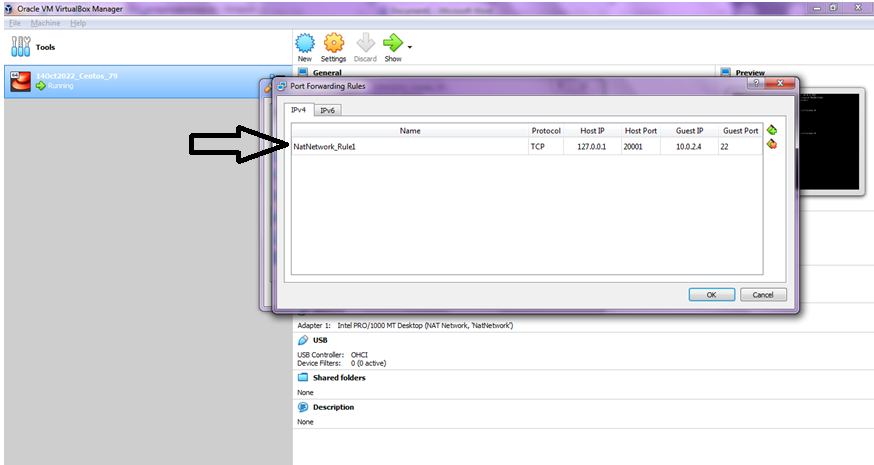
a) Goto Virtualbox->File->Preference->Network->Port Forwarding ->Edit the rule name to something meaningful ->enter "127.0.0.1" in HOST IP, Port number above 20000 (say 20001) in Host Port, -> enter the IP you saw from the "ip a" output into the guest IP, Port 22 into the Guest Port. Save the setting and close the prompts.


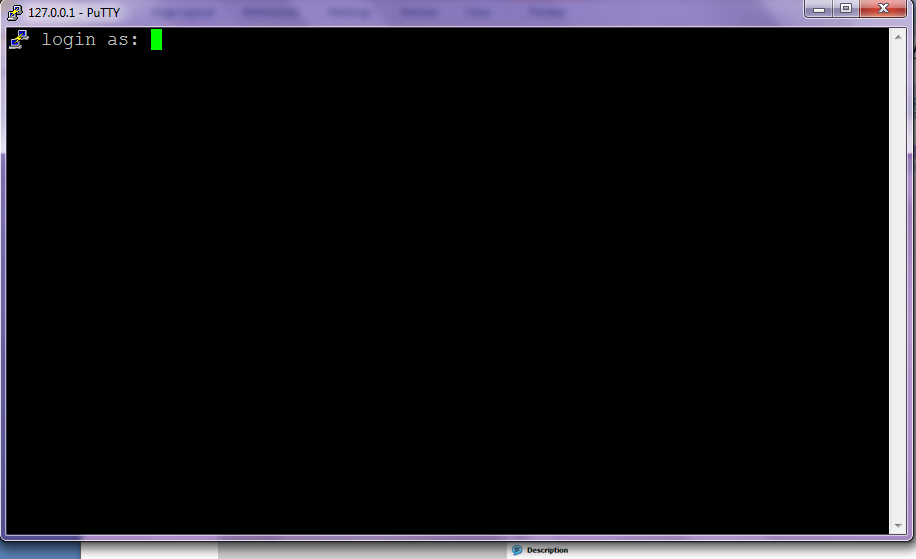
b) Now open putty from the local Host machine, enter 127.0.0.1 in the host address space and port# in the port space.


Your allset with your basic machine setup, from here on you should be able to any further application specific configuration.


Done!!!

Thursday, October 13, 2022

Oracle Virtual Box - Create Virtual machine doesnt offer 64 bit OS choice - offers only 32 bit option

 Dear Readers,

This blog is about setting up 64bit Virtual machines on atleast 10 year old hardware based out of intel core 2 duo, see below image....


I needed to boot my old  desktop hardware  to substitute my laptop which is in service... which is when I realized, I didnt have an option to choose 64 bit version of OS under Oracle Virtualbox under create new VM (my lab), see below...


Now to enable the 64 bit os listing, we have to enable hardware virtualization to support resource sharing (cpu,memory,io,network,graphics etc..) between host OS and Virtualbox VMs.

In the above bios screenshot (you have to use F2 key to go to bios), please choose boot and enable the virtualization technique. For instance in my case it was "Intel(r) VT" which by default is in disabled mode, I enabled it and then "EXIT Saving the configuration". On reboot again, I could see the 64 bit virtualbox vms available now.


Hence always enable (in latest hardwares I guess it by default is enabled) the hardware virtualization to see 64bit OS versions available in your list.

Thanks


Thursday, October 6, 2022

Centos Linux - Various OS performance monitoring tools

 Dear Readers,

In this blog we will see unique performance monitoring tools for Centos Linux.


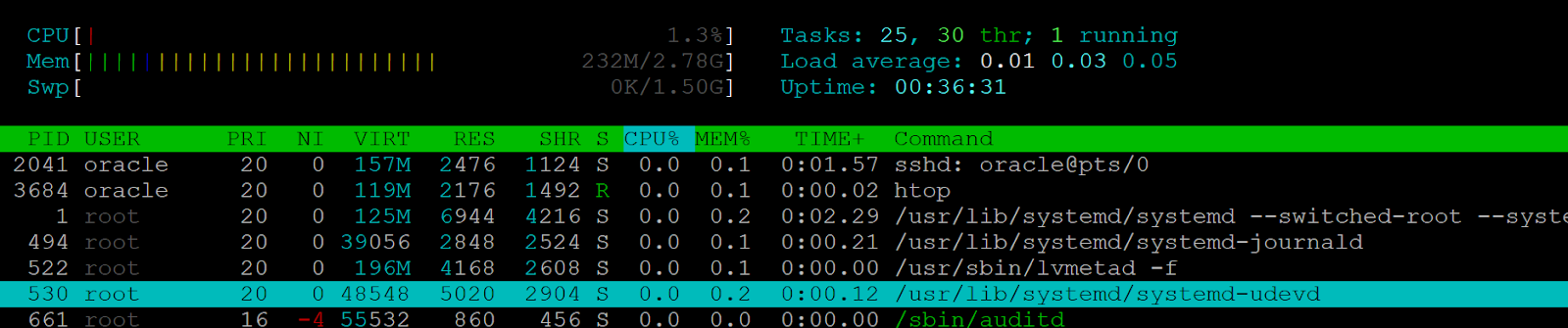
htop (the command doesnt come by default, you have to install it using yum)

Screenshot below:


atop (the command doesnt come by default, you have install it using yum)

Screenshot below:


dstat is one other unique tool

Command: dstat -c -d -g -l -m -n -r -s

[oracle@10 06Oct2022_OStest]$ dstat -c -d -g -l -m -n -r -s
Terminal width too small, trimming output.
----total-cpu-usage---- -dsk/total- ---paging-- ---load-avg--- ------memory-usage----- -net/total- --io/total->
usr sys idl wai hiq siq| read  writ|  in   out | 1m   5m  15m | used  buff  cach  free| recv  send| read  writ>
  0   1  98   0   0   1| 163k  660k|   0     0 |   0 0.01 0.05| 281M 2108k 1205M 1358M|   0     0 |7.26  2.79 >
  0   0 100   0   0   0|   0     0 |   0     0 |   0 0.01 0.05| 281M 2108k 1205M 1358M|  60B 1270B|   0     0 >
  0   1  99   0   0   0|   0     0 |   0     0 |   0 0.01 0.05| 281M 2108k 1205M 1358M|  60B  486B|   0     0 >
  0   0 100   0   0   0|   0     0 |   0     0 |   0 0.01 0.05| 281M 2108k 1205M 1358M|  60B  486B|   0     0 >
  0   0 100   0   0   0|   0     0 |   0     0 |   0 0.01 0.05| 281M 2108k 1205M 1358M|  60B  486B|   0     0 >


This was a very quick blog!