Showing posts with label ps. Show all posts

Thursday, February 13, 2025

Oracle external table to read the pre-processed file output from a os process monitoring command and perform aggregation or analytics to get more intelligence

Oracle external table to read the pre-processed file output from a os process monitoring command and perform aggregation or analytics to get more intelligence


Reference: https://asktom.oracle.com/Misc/oramag/preprocess-external-tables.html

YouTube:


Step1) Ensure you have the file which we wanted to process using oracle external table is ready already


[oracle@vcentos79-oracle-sa1 OSpsstat]$ pwd

/home/oracle/dba/OSpsstat

[oracle@vcentos79-oracle-sa1 OSpsstat]$ ls -altr

...

-rw-r--r--.  1 oracle oinstall  24526 Feb 13 23:03 tmp_st4_02

-rw-r--r--.  1 oracle oinstall  73604 Feb 13 23:03 processed_ps2.out

drwxr-xr-x.  2 oracle oinstall   4096 Feb 14 00:02 .

-rw-r--r--.  1 oracle oinstall    160 Feb 14 00:02 OSPSW_20515.bad

-rw-r--r--.  1 oracle oinstall  19293 Feb 14 00:07 OSPSW_20515.log

[oracle@vcentos79-oracle-sa1 OSpsstat]$ wc -l processed_ps2.out

752 processed_ps2.out

[oracle@vcentos79-oracle-sa1 OSpsstat]$


Step2) Frame external table command from the output of the file present in os

Example:


create table indata1

(

    cust_id     number,

    cust_name    varchar2(20),

    credit_limit number(10)

)

organization external

(

    type oracle_loader

    default directory etl_dir

    access parameters

    (

       records delimited by newline

       fields terminated by ","

    )

location ('indata1.txt')

)

/


Actual:


create directory ospsw_data as '/home/oracle/dba/OSpsstat';


create table ospsw

(

sampltm date,

osusr varchar2(50),

ospid number,

osppid number,

prprty number,

pcpu varchar2(10),

pmem varchar2(10),

vsz number,

rss number,

wchain varchar2(50),

processstat varchar2(3),

processstart varchar2(20),

processdur varchar2(20),

processcmd varchar2(1000)

)

organization external

(

    type oracle_loader

    default directory ospsw_data

    access parameters

    (

       records delimited by newline

       fields terminated by ","

       (

        sampltm date "dd/mon/yyyy hh24:mi:ss",

        osusr char(50),

        ospid char(10),

        osppid char(10),

        prprty char(10),

        pcpu char(20),

        pmem char(20),

        vsz char(20),

        rss char(20),

        wchain char(50),

        processstat char(3),

        processstart char(20),

        processdur char(20),

        processcmd char(1000)

       )

    )

location ('processed_ps2.out')

)

/


Output:


SQL> drop table ospsw;


Table dropped.


SQL> create table ospsw

(

sampltm date,

osusr varchar2(50),

ospid number,

osppid number,

prprty number,

pcpu varchar2(10),

pmem varchar2(10),

vsz number,

rss number,

wchain varchar2(50),

processstat varchar2(3),

processstart varchar2(20),

processdur varchar2(20),

processcmd varchar2(1000)

)

organization external

(

    type oracle_loader

    default directory ospsw_data

    access parameters

    (

       records delimited by newline

       fields terminated by ","

       (

        sampltm date "dd/mon/yyyy hh24:mi:ss",

        osusr char(50),

        ospid char(10),

        osppid char(10),

        prprty char(10),

  2    3    4    5    6    7    8    9   10   11   12   13   14   15   16   17   18   19   20   21   22   23   24   25   26   27   28   29   30   31   32          pcpu char(20),

        pmem char(20),

        vsz char(20),

        rss char(20),

        wchain char(50),

        processstat char(3),

        processstart char(20),

        processdur char(20),

        processcmd char(1000)

       )

    )

location ('processed_ps2.out')

)

/ 33   34   35   36   37   38   39   40   41   42   43   44   45


Table created.


SQL> select count(1) from ospsw;


  COUNT(1)

----------

       752


SQL>


step 3) Start querying the data and start to perform analytical/aggregation functions


SQL> select sampltm,sum(to_number(pcpu)),sum(to_number(pmem)),sum(vsz) from ospsw group by sampltm order by 1;


SAMPLTM             ,SUM(TO_NUMBER(PCPU)),SUM(TO_NUMBER(PMEM)),  SUM(VSZ)

--------------------,--------------------,--------------------,----------

13/FEB/2025 22:44:42,                  .3,                 3.2,   7884632

13/FEB/2025 22:45:12,                  .3,                 3.2,   7884632

13/FEB/2025 22:45:42,                  .3,                 3.2,   7884632

13/FEB/2025 22:46:12,                  .3,                 3.2,   7884632


SQL>


Errors to be aware:

SQL> create table ospsw

(

sampltm date,

osusr varchar2(50),

ospid number,

osppid number,

prprty number,

pcpu number(5,4),

pmem number(5,4),

vsz number,

rss number,

wchain varchar2(50),

  2    3    4    5    6    7    8    9   10   11   12   13  processstat varchar2(3),

processstart varchar2(20),

processdur varchar2(20),

processcmd varchar2(1000)

)

organization external

(

    type oracle_loader

 14   15   16   17   18   19   20   21      default directory ospsw_data

    access parameters

    (

       records delimited by newline

 22   23   24   25         fields terminated by ","

       (

 26   27          sampltm date "dd/mon/yyyy hh24:mi:ss",

 28          osusr char(50),

        ospid number,

 29   30          osppid number,

 31          prprty number,

        pcpu char(10),

        pmem char(10),

        vsz number,

        rss number,

 32   33   34   35   36          wchain char(50),

        processstat char(3),

        processstart char(20),

        processdur char(20),

        processcmd char(1000)

       )

    )

location ('processed_ps2.out')

)

/ 37   38   39   40   41   42   43   44   45


Table created.


SQL> select sampltm,sum(to_number(pcpu)),sum(to_number(pmem)),sum(vsz) from ospsw group by sampltm order by 1;

select sampltm,sum(to_number(pcpu)),sum(to_number(pmem)),sum(vsz) from ospsw group by sampltm order by 1

*

ERROR at line 1:

ORA-29913: error in executing ODCIEXTTABLEOPEN callout

ORA-29400: data cartridge error

KUP-00554: error encountered while parsing access parameters

KUP-01005: syntax error: found "identifier": expecting one of: "binary_double, binary_float, comma, char, convert_error, date, defaultif, decimal, double, float, integer, (, lls, lls_compat, no, nullif, oracle_date, oracle_number, position, raw, recnum, ), unsigned, varrawc, varchar, varraw, varcharc, zoned"

KUP-01008: the bad identifier was: number

KUP-01007: at line 6 column 15


This is because of usage of number data type in the access delimiter definition which isn’t accepted by oracle it seems.

Assess process monitoring output in Linux to identify the root cause of the issue - with Gen AI assistance


Requirement: Launch a process monitoring command and process the output using a shell script & use an AI tool to document the flow


tools: Shell script, gemini & mermaidchart.com


This is part of a multipart series in identifying a root cause on a typical chicken-egg story kind of issue :)


YouTube: 


Step 1) Command which monitors the process:


You can launch the below command on a abnormally loaded machine; so you can use this output to assess the RCA. As going after top command every minute is challenging.


while true

do

echo "zzz ***$(date '+%a %b %e %T %Z %Y')" >> /tmp/psinfo2.out

ps -aeo user,pid,ppid,pri,pcpu,pmem,vsize,rssize,wchan:42,s,start,cputime,command >> /tmp/psinfo2.out

sleep 30

done


Step 2) Develop a script that is able to digest the above commands output and print it to a more readable info [preprocess]


#!/bin/ksh

if [ $# -ne 1 ]

then

echo "please provide valid osstats file"

exit 1

fi

rm tmp_stp*.out

grep "zzz" $1 > tmp_stp1.out

unset j

while read line

do

i=$(echo $line|cut -d ' ' -f 3-7)

if ${j+"false"}

then

j=$i

else

## in this step we break the file into working piece with only necessary content using sed & awk

##first break the file into 1 sample @ a time

sed -n "/$j/,/$i/p" $1 >tmp_stp2.out;

##sort the file on field 11 to fix the start time issues like since "Jan 28" & for last 13:00:00 etc.. since both needs different processing.

sort -nk11 tmp_stp2.out >tmp_stp3.out;

csplit -z tmp_stp3.out /zzz/ '{*}' -f 'tmp_stp4_' >/dev/null 2>&1;

for a in $(ls -tr tmp_st4_*)

do

sed -i '/zzz/d' $a;

sed -i '/WCHAN/d' $a;

sed -r -i '/^\s*$/d' $a;

lncnt=$(cat $a|wc -l);

if [ ${lncnt} -gt 0 ]; then

chk1=$(head -1 $a|awk '{print $11}');

dt=$(date -d"$j" '+%d/%b/%Y %H:%M:%S');

if [[ "$chk1" =~ ^[a-zA-Z]+$ ]]; then

while read line2

do

tmpln=$(echo $line2|awk '{print $1","$2","$3","$4","$5","$6","$7","$8","$9","$10","$11"-"$12","$13}');

echo $dt","${tmpln}

done <$a

else

while read line2

do

tmpln=$(echo $line2|awk '{print $1","$2","$3","$4","$5","$6","$7","$8","$9","$10","$11","$12","$13}');

echo $dt","${tmpln}

done <$a

fi

fi

done

j=$i

fi

done <tmp_stp1.out


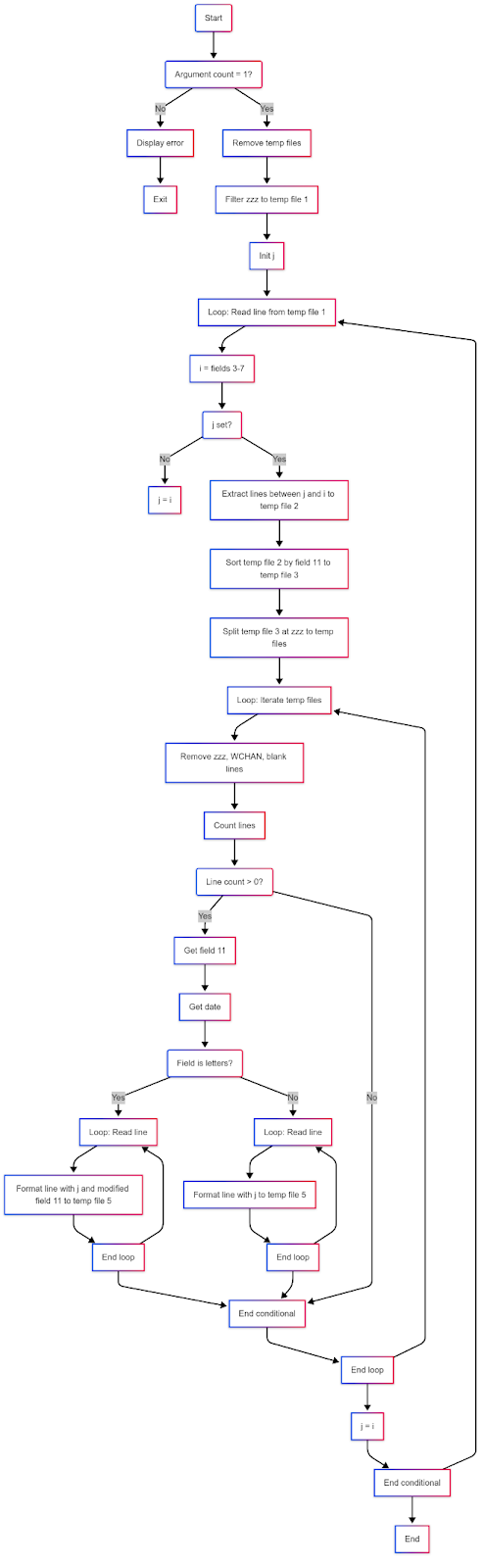
Step 3) document the above code flow diagram and write code information (kind of readme) using GENAI

Here we will use gemini… I pasted the output from gemini below after several prompts to make it accurarte


graph TD A(Start) --> B(Argument count = 1?); B -- No --> C[Display error]; C --> D[Exit]; B -- Yes --> E[Remove temp files]; E --> F[Filter zzz to temp file 1]; F --> G[Init j]; G --> H[Loop: Read line from temp file 1]; H --> I[i = fields 3-7]; I --> J(j set?); J -- No --> K[j = i]; J -- Yes --> L[Extract lines between j and i to temp file 2]; L --> M[Sort temp file 2 by field 11 to temp file 3]; M --> N[Split temp file 3 at zzz to temp files]; N --> O[Loop: Iterate temp files]; O --> P[Remove zzz, WCHAN, blank lines]; P --> Q[Count lines]; Q --> R(Line count > 0?); R -- Yes --> S[Get field 11]; S --> T[Get date]; T --> U(Field is letters?); U -- Yes --> V[Loop: Read line]; V --> W[Format line with j and modified field 11 to temp file 5]; W --> X[End loop]; X --> Y[End conditional]; U -- No --> AA[Loop: Read line]; AA --> AB[Format line with j to temp file 5]; AB --> AC[End loop]; AC --> Y; R -- No --> Y; Y --> AD[End loop]; AD --> AE[j = i]; AE --> AF[End conditional]; AF --> H; AF --> AG[End]; X --> V; AC --> AA; AD --> O;


Step 4) Invoke the script developed


sh processosstat.sh <inputfile> ><processed_output.file>


sh processosstat_noop.sh /tmp/psinfo2.out >processed_ps2.out


Output:

[oracle@vcentos79-oracle-sa1 OSpsstat]$ head -10 processed_ps2.out

13/Feb/2025 22:44:42,chrony,920,1,19,0.0,0.0,117808,1852,poll_schedule_timeout,S,11:51:53,00:00:00,/usr/sbin/chronyd

13/Feb/2025 22:44:42,dbus,915,1,19,0.0,0.0,66456,2584,ep_poll,S,11:51:53,00:00:00,/usr/bin/dbus-daemon

13/Feb/2025 22:44:42,oracle,11558,11548,19,0.0,0.0,163364,2672,poll_schedule_timeout,S,11:56:04,00:00:00,sshd:

13/Feb/2025 22:44:42,oracle,11559,11558,19,0.0,0.0,115680,2208,do_wait,S,11:56:04,00:00:00,-bash

13/Feb/2025 22:44:42,oracle,930,1,19,0.2,1.0,1180400,41332,futex_wait_queue_me,S,11:51:53,00:00:14,/u01/app/oracle/product/21.3.0/ogg_home_1/bin/ServiceManager

13/Feb/2025 22:44:42,polkitd,929,1,19,0.0,0.2,613016,9176,poll_schedule_timeout,S,11:51:53,00:00:00,/usr/lib/polkit-1/polkitd

13/Feb/2025 22:44:42,postfix,1984,1979,19,0.0,0.1,89976,4108,ep_poll,S,11:51:59,00:00:00,qmgr

13/Feb/2025 22:44:42,root,1,0,19,0.0,0.1,128280,6972,ep_poll,S,11:51:45,00:00:02,/usr/lib/systemd/systemd

13/Feb/2025 22:44:42,root,10,2,39,0.0,0.0,0,0,rescuer_thread,S,11:51:45,00:00:00,[lru-add-drain]

13/Feb/2025 22:44:42,root,11,2,139,0.0,0.0,0,0,smpboot_thread_fn,S,11:51:45,00:00:00,[watchdog/0]

[oracle@vcentos79-oracle-sa1 OSpsstat]$


Step 5) Now use your favourite tool include excel to perform analytics


This will be part 2 in our case.


Thank you!


OKV platform certificate rotation - pitfall , awareness!!!!

OKV version: 21.9 Setup: Multimaster R/W cluster Plan: https://docs.google.com/spreadsheets/d/e/2PACX-1vSaXXTjj9cE1fvYpNmsDNBOkTIw78yTwQ6a9o...