Oracle Database and Java Universal Connection Pool
Objective: Asses how does an application (Universal Connection Pool - JDBC) connection pool work in oracle database
Reference urls:
https://github.com/oracle-samples/oracle-db-examples/blob/main/java/jdbc/BasicSamples/UCPTimeouts.java
https://docs.oracle.com/en/database/oracle/oracle-database/19/jjdbc/JDBC-diagnosability.html
https://www.oracle.com/uk/database/technologies/appdev/jdbc-downloads.html
Step 1)
Understand what is connection pool and why it is needed
Connection types:
Dedicated ( 1 client - 1 server)
Shared ( Many Client - 1 or more shared server) - DXXX
Pooled ( Many Client - 1 or more pooled dedicated server) - CMAN (NXXX)
Website -> service call (java program -> UCP -> jdbc connection) -> oracle db
Step 2)
Download and edit the needed UCP sample file from oracle public repo in github
Download necessary jdbc.jar and ucp.jar (you will need on top jdk 8+)
Step 3)
Prepare the sql statement to used in oracle db to assess the pool statistics
The below code can be downloaded from github: https://github.com/svrajadba/ucp.git
--cpool.sql
col machine for a45
col program for a45
col username for a20
col event for a40
col total_process for a10
show parameter process;
select count(1) from v$process;
select a.value total_process
,b.used_process
,(a.value-b.used_process) free_process
from v$parameter a
,(select count(1) used_process from v$process) b
where a.name='processes';
select machine,count(1) from v$session group by machine order by 1;
select machine,program,count(1) from v$session group by machine,program order by 1,2;
select machine,program,username,count(1) from v$session group by machine,program,username order by 1,2,3;
select machine,program,username,count(1) from v$session where username='SCH_HELLOWORLD' and program='UCPTimeouts' group by machine,program,username order by 1,2,3;
select sid,serial#,username,machine,status,state,logon_time,sql_id,sql_exec_start,event,prev_sql_id,prev_exec_start from v$session where username='SCH_HELLOWORLD' and program='UCPTimeouts' order by sid;
#cpool.ksh
#!/bin/ksh
export ORACLE_SID=ORA19C
export ORAENV_ASK=NO
. oraenv >/dev/null 2>&1
tstmp=$(echo $(date '+%d%m%y_%H%M%S'))
sqlplus '/as sysdba' << SQLEOF >${tstmp}_cpoolstatus_check.out
set echo on
set feedback on
set lines 1200 pages 3000 colsep , time on timing on trim on trims on
alter session set nls_Date_format='DD/MON/YYYY HH24:MI:SS';
@cpool.sql
exit;
SQLEOF
echo "Output file: " ${tstmp}_cpoolstatus_check.out
Step 4)
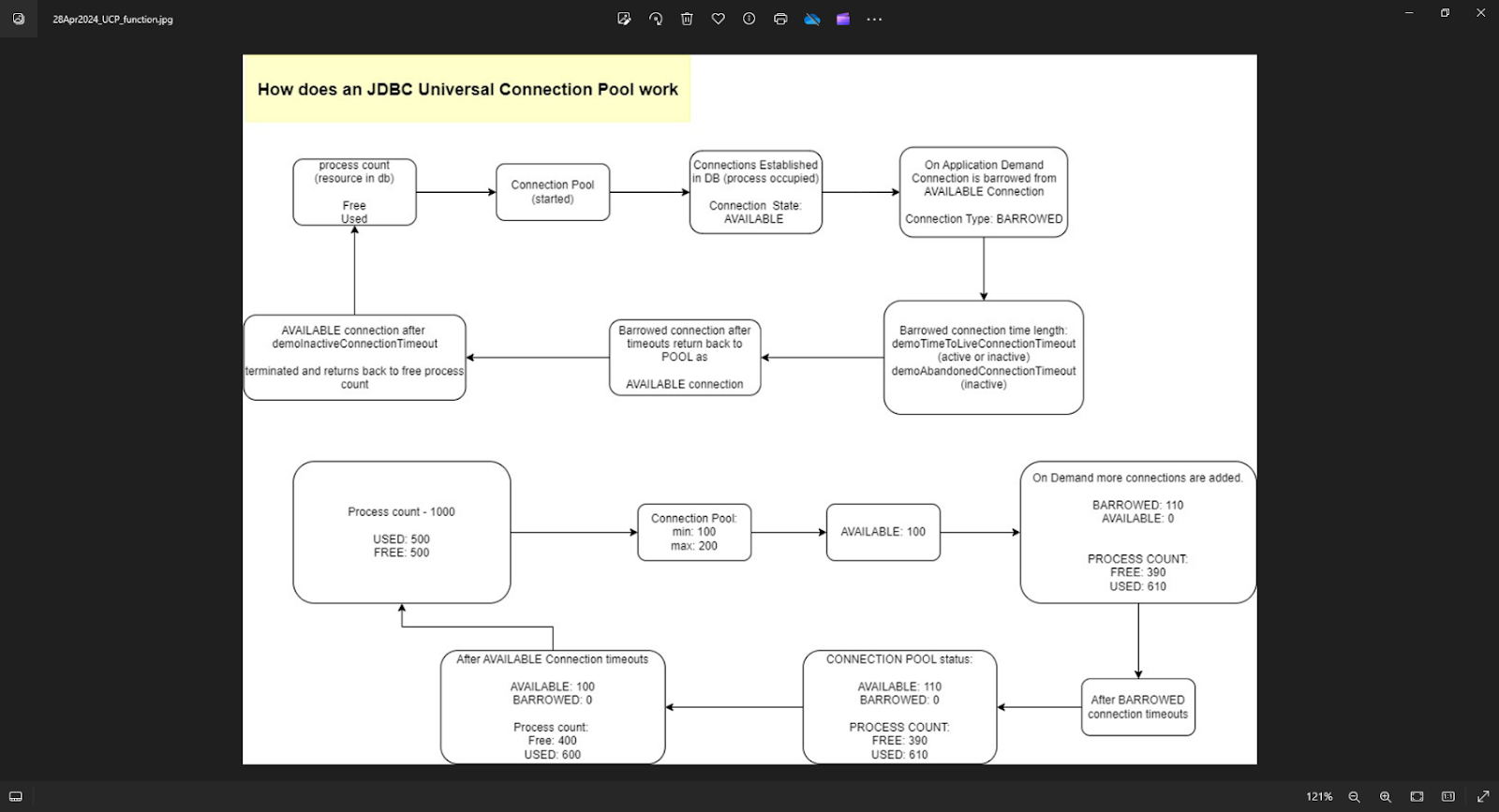
Understand the UCP program test flow
A) test routine 1: The connection pool reaches its max limit and a new incoming client request fails to create a new connection
B) test routine 2: The available connection after reaching demoInactiveConnectionTimeout value in idle time is terminated and process resource is released
C) test routine 3: The barrowed connection after reaching demoTimeToLiveConnectionTimeout value in time irrespective of active or inactive is released to available status in connection pool
D) test routine 4: The barrowed connection after reaching demoAbandonedConnectionTimeout value in inactive status is released to available status in connection pool
Step 5)
Compile the code
javac -classpath ./ojdbc8.jar:./ucp.jar:. UCPTimeouts.java
ignore warning:
Note: UCPTimeouts.java uses or overrides a deprecated API.
Note: Recompile with -Xlint:deprecation for details.
You should get the class file now: UCPTimeouts.class
Output:
[oracle@vcentos79-oracle-sa1 vagrant]$ ls -altr UCPTim*.java
-rwxrwxrwx. 1 vagrant vagrant 13600 Apr 28 08:11 UCPTimeouts.java
[oracle@vcentos79-oracle-sa1 vagrant]$ javac -classpath ./ojdbc8.jar:./ucp.jar:. UCPTimeouts.java
Note: UCPTimeouts.java uses or overrides a deprecated API.
Note: Recompile with -Xlint:deprecation for details.
[oracle@vcentos79-oracle-sa1 vagrant]$ ls -altr ./ojdbc8.jar ./ucp.jar
-rwxrwxrwx. 1 vagrant vagrant 6980481 Apr 25 11:20 ./ojdbc8.jar
-rwxrwxrwx. 1 vagrant vagrant 1485969 Apr 25 11:20 ./ucp.jar
[oracle@vcentos79-oracle-sa1 vagrant]$ ls -altr *.class
...
-rwxrwxrwx. 1 vagrant vagrant 8927 Apr 28 09:40 UCPTimeouts.class
[oracle@vcentos79-oracle-sa1 vagrant]$
Step 6)
Have the shell script ready for execution in another screen
Output:
[oracle@vcentos79-oracle-sa1 UCPLab]$ sh cpool.ksh
Output file: 280424_094507_cpoolstatus_check.out
[oracle@vcentos79-oracle-sa1 UCPLab]$ sh cpool.ksh
Output file: 280424_094518_cpoolstatus_check.out
[oracle@vcentos79-oracle-sa1 UCPLab]$ sh cpool.ksh
Output file: 280424_094539_cpoolstatus_check.out
[oracle@vcentos79-oracle-sa1 UCPLab]$ sh cpool.ksh
Output file: 280424_094550_cpoolstatus_check.out
[oracle@vcentos79-oracle-sa1 UCPLab]$ sh cpool.ksh
Output file: 280424_094605_cpoolstatus_check.out
[oracle@vcentos79-oracle-sa1 UCPLab]$ sh cpool.ksh
Output file: 280424_094620_cpoolstatus_check.out
[oracle@vcentos79-oracle-sa1 UCPLab]$ sh cpool.ksh
Output file: 280424_094636_cpoolstatus_check.out
[oracle@vcentos79-oracle-sa1 UCPLab]$
[oracle@vcentos79-oracle-sa1 UCPLab]$ ls -altr
total 140
drwxr-xr-x. 9 oracle oinstall 4096 Apr 28 08:40 ..
drwxr-xr-x. 7 oracle oinstall 141 Apr 28 08:47 .git
-rw-r--r--. 1 oracle oinstall 978 Apr 28 09:03 cpool.sql
-rw-r--r--. 1 oracle oinstall 418 Apr 28 09:05 cpool.ksh
drwxr-xr-x. 2 oracle oinstall 4096 Apr 28 09:13 Arch
-rw-r--r--. 1 oracle oinstall 12552 Apr 28 09:45 280424_094507_cpoolstatus_check.out
-rw-r--r--. 1 oracle oinstall 14186 Apr 28 09:45 280424_094518_cpoolstatus_check.out
-rw-r--r--. 1 oracle oinstall 12977 Apr 28 09:45 280424_094539_cpoolstatus_check.out
-rw-r--r--. 1 oracle oinstall 12977 Apr 28 09:45 280424_094550_cpoolstatus_check.out
-rw-r--r--. 1 oracle oinstall 12253 Apr 28 09:46 280424_094605_cpoolstatus_check.out
-rw-r--r--. 1 oracle oinstall 13880 Apr 28 09:46 280424_094620_cpoolstatus_check.out
drwxr-xr-x. 4 oracle oinstall 4096 Apr 28 09:46 .
-rw-r--r--. 1 oracle oinstall 12619 Apr 28 09:46 280424_094636_cpoolstatus_check.out
[oracle@vcentos79-oracle-sa1 UCPLab]$
Step 7)
Launch the java program now
java -classpath ./ojdbc8.jar:./ucp.jar:. UCPTimeouts
Output:
[oracle@vcentos79-oracle-sa1 vagrant]$ java -classpath ./ojdbc8.jar:./ucp.jar:. UCPTimeouts
[ Password for SCH_HELLOWORLD: ]
*** Demo ConnectionWaitTimeout ***
Connection pool UCPTimeouts_pool1 configured
Max pool size: 5
Borrow connections to reach max pool size.
After all connections are borrowed -
Available connections: 0
Borrowed connections: 5
Now trying to borrow another connection from pool ...
Getting expected error after ConnectionWaitTimeout
Return all borrowed connections to pool
Connection pool UCPTimeouts_pool1 destroyed
*** Demo ConnectionWaitTimeout completes ***
*** Demo InactiveConnectionTimeout ***
Connection pool UCPTimeouts_pool2 configured
Min pool size: 5
Max pool size: 10
Borrow connections to reach min pool size.
After borrowing connections -
Available connections: 5
Borrowed connections: 5
Sleep for 15 seconds to trigger InactiveConnectionTimeout.
Available connections beyond MinPoolSize are expected to close
After InactiveConnectionTimeout -
Available connections: 0
Borrowed connections: 5
Return all borrowed connections to pool
Check DB:
Connection pool UCPTimeouts_pool2 destroyed
*** Demo InactiveConnectionTimeout completes ***
*** Demo TimeToLiveConnectionTimeout ***
Connection pool UCPTimeouts_pool3 configured
Max pool size: 5
Borrow connections to reach max pool size.
After all connections are borrowed -
Available connections: 0
Borrowed connections: 5
Sleep for 15 seconds to trigger TimeToLiveConnectionTimeout.
All borrowed connections are expected to be returned to pool.
After TimeToLiveConnectionTimeout -
Available connections: 1
Borrowed connections: 0
Check DB:
Connection pool UCPTimeouts_pool3 destroyed
*** Demo TimeToLiveConnectionTimeout completes ***
*** Demo AbandonedConnectionTimeout ***
Connection pool UCPTimeouts_pool4 configured
Max pool size: 10
Borrow connections to reach max pool size.
After all connections are borrowed -
Available connections: 0
Borrowed connections: 10
Do some work periodically only on 3 borrowed connections ...
Sleep for 15 seconds to trigger AbandonedConnectionTimeout.
All borrowed connections other than the 3 are expected to be returned to pool.
After AbandonedConnectionTimeout -
Available connections: 0
Borrowed connections: 3
Check DB:
Connection pool UCPTimeouts_pool4 destroyed
*** Demo AbandonedConnectionTimeout completes ***
[oracle@vcentos79-oracle-sa1 vagrant]$
Step 8)
Execute in parallel to step 7 the shell from another screen.
Step 9)
Document your observations


