Monday, June 19, 2023

Setup Oracle Golden Gate 21.3 Microservice software in silent mode using response file and command line argument

Setup Golden Gate Microservice software in silent mode using response file and command line argument


Setup environment details:

Hostname: vcentos79-oracle-sby1
IP: 192.168.194.6
Is it db server: Yes
DB Name: DBCASLNT
CDB: NO
DB Version: 19c
OS version: RHEL7.9

Please refer to the following blog for PreReqs,binary download & OS certification info.
blog url: Oracle Golden Gate Setup using GUI

OGG_SOFTWARE unzip location:

ls -ld /u01/app/software/21.3.0_oggsc [will fail saying path not found]
mkdir -p /u01/app/software/21.3.0_oggsc
ls -ld /u01/app/software/21.3.0_oggsc [path will be there now]

Unlike oracle home, the Oracle Golden Gate Software still needs to be copied using runInstaller. In case of ORACLE_HOME, the download is a golden image, where we unzip the software into the target ORACLE_HOME itself.

OGG_HOME:

ls -ld /u01/app/oracle/product/21.3.0/ogg_home_1 [will fail saying path not found]
mkdir -p /u01/app/oracle/product/21.3.0/ogg_home_1
ls -ld /u01/app/oracle/product/21.3.0/ogg_home_1 [path will be there now]

Step Unzip the GG binary into the OGG_SOFTWARE location:

[oracle@vcentos79-oracle-sby1 21.3.0_oggsc]$ unzip /vagrant/213000_fbo_ggs_Linux_x64_Oracle_services_shiphome.zip
Archive:  /vagrant/213000_fbo_ggs_Linux_x64_Oracle_services_shiphome.zip
   creating: fbo_ggs_Linux_x64_Oracle_services_shiphome/
...
  inflating: fbo_ggs_Linux_x64_Oracle_services_shiphome/Disk1/install/.oui
  inflating: fbo_ggs_Linux_x64_Oracle_services_shiphome/Disk1/runInstaller
  inflating: OGG-21.3.0.0-README.txt
  inflating: oracle-goldengate-release-notes_21.3.pdf
[oracle@vcentos79-oracle-sby1 21.3.0_oggsc]$ pwd
/u01/app/software/21.3.0_oggsc
[oracle@vcentos79-oracle-sby1 21.3.0_oggsc]$

Let us kick off the install in silent mode [pls note, we are using the default response file only, no customization, we are supplying all the input variables in command line]

Response file presence validation:
[oracle@vcentos79-oracle-sby1 Disk1]$ ls -altr /u01/app/software/21.3.0_oggsc/fbo_ggs_Linux_x64_Oracle_services_shiphome/Disk1/response/oggcore.rsp
-rw-rw-r--. 1 oracle oinstall 3440 Jul 29  2021 /u01/app/software/21.3.0_oggsc/fbo_ggs_Linux_x64_Oracle_services_shiphome/Disk1/response/oggcore.rsp

Go to the runInstaller path:
[oracle@vcentos79-oracle-sby1 Disk1]$ pwd
/u01/app/software/21.3.0_oggsc/fbo_ggs_Linux_x64_Oracle_services_shiphome/Disk1

Launch runInstaller:
Command:
./runInstaller -silent -showProgress -waitForCompletion \
-responseFile /u01/app/software/21.3.0_oggsc/fbo_ggs_Linux_x64_Oracle_services_shiphome/Disk1/response/oggcore.rsp \
INSTALL_OPTION=ORA21c \
SOFTWARE_LOCATION=/u01/app/oracle/product/21.3.0/ogg_home_1 \
START_MANAGER=false \
INVENTORY_LOCATION=/u01/app/oraInventory \
UNIX_GROUP_NAME=dba


Actual command output:
[oracle@vcentos79-oracle-sby1 Disk1]$ ./runInstaller -silent -showProgress -waitForCompletion \
> -responseFile /u01/app/software/21.3.0_oggsc/fbo_ggs_Linux_x64_Oracle_services_shiphome/Disk1/response/oggcore.rsp \
> INSTALL_OPTION=ORA21c \
> SOFTWARE_LOCATION=/u01/app/oracle/product/21.3.0/ogg_home_1 \
> START_MANAGER=false \
> INVENTORY_LOCATION=/u01/app/oraInventory \
> UNIX_GROUP_NAME=dba
Starting Oracle Universal Installer...
Checking Temp space: must be greater than 120 MB.   Actual 3710 MB    Passed
Checking swap space: must be greater than 150 MB.   Actual 3071 MB    Passed
Preparing to launch Oracle Universal Installer from /tmp/OraInstall2023-06-18_04-39-46PM. Please wait ...You can find the log of this install session at:
 /u01/app/oraInventory/logs/installActions2023-06-18_04-39-46PM.log
Prepare in progress.
..................................................   10% Done.
Prepare successful.
Copy files in progress.
..................................................   53% Done.
..................................................   58% Done.
..................................................   64% Done.
..................................................   70% Done.
..................................................   75% Done.
..................................................   80% Done.
..................................................   85% Done.
..................................................   91% Done.
Copy files successful.
Link binaries in progress.
Link binaries successful.
Setup files in progress.
..................................................   95% Done.
..................................................   96% Done.
..................................................   97% Done.
..................................................   99% Done.
Setup files successful.
Setup Inventory in progress.
Setup Inventory successful.
..................................................   95% Done.
Successfully Setup Software.
..................................................   100% Done.
Finish Setup successful.
The installation of Oracle GoldenGate Services was successful.
Please check '/u01/app/oraInventory/logs/silentInstall2023-06-18_04-39-46PM.log' for more details.
[oracle@vcentos79-oracle-sby1 Disk1]$

Outcome: The installation of Oracle GoldenGate Services was successful.

Logfile Message:
INFO: Executing command find /u01/app/oraInventory/logs -type f -exec chmod  -f 0640 {} ";"
INFO: Current Inventory:
        Oracle Home: OraDB19Home1
                This Oracle Home has not been changed in this session.
        Oracle Home: OraGI19Home1
                This Oracle Home has not been changed in this session.
        Oracle Home: OraHome1
                Java Development Kit 1.8.0.291.09
                oracle.swd.oui.core.min 12.2.0.9.0
                Installer SDK Component 12.2.0.9.0
                Oracle One-Off Patch Installer 12.2.0.1.17
                Oracle Universal Installer 12.2.0.9.0
                Oracle GoldenGate Services for Oracle Database 21c and lower supported versions 21.1.0.0.0
                oracle.swd.commonlogging 13.3.0.0.0
                oracle.swd.opatchautodb 12.2.0.1.5
                Oracle GoldenGate Services 21.1.0.0.0
INFO: OiicSaveInvWCCE:After saving the inventory. This is an Install session.
INFO: OiicSaveInvWCCE:After saving the inventory. The platform is unix.
INFO: OiicSaveInvWCCE:After saving the inventory. The location of root.sh is /u01/app/oracle/product/21.3.0/ogg_home_1/root.sh
INFO: Setting permission on dir : /u01/app/oracle/product/21.3.0/ogg_home_1/inventory
INFO: Executing command find /u01/app/oracle/product/21.3.0/ogg_home_1/inventory -type d -exec chmod  -f 0750 {} ";"
INFO: Executing command find /u01/app/oracle/product/21.3.0/ogg_home_1/inventory -type f -exec chmod  -f 0640 {} ";"
INFO: InstallProgressMonitor: Completed phase 16
INFO: SaveInvWCCE JRE files in Scratch :0
...
INFO: Adding iterator oracle.sysman.oii.oiif.oiifw.OiifwRootShWCDE
INFO:
*** End of Installation Page***
The installation of Oracle GoldenGate Services was successful. <<<<<<<<<<<<<< message
INFO: Updating the global context
INFO: Path To 'globalcontext.xml' = /u01/app/oracle/product/21.3.0/ogg_home_1/install/chainedInstall/globalcontext
INFO: Since operation was successful, move the current OiicAPISessionDetails to installed list
INFO: Number of root scripts to be executed = 0 <<<<<<<<<<<<<<< No need to excute root.sh
INFO: isSuccessfullInstallation: true
INFO: isSuccessfullRemoteInstallation: true
..
INFO: Exit Status is 0
INFO: Shutdown Oracle GoldenGate


Binary validation:

[oracle@vcentos79-oracle-sby1 logs]$ cd /u01/app/oracle/product/21.3.0/ogg_home_1
[oracle@vcentos79-oracle-sby1 ogg_home_1]$ pwd
/u01/app/oracle/product/21.3.0/ogg_home_1
[oracle@vcentos79-oracle-sby1 ogg_home_1]$ ls -altr
total 16
drwxr-xr-x.  3 oracle oinstall   24 Jun 18 16:31 ..
drwxr-xr-x.  3 oracle oinstall   20 Jun 18 16:40 diagnostics
drwxr-xr-x.  3 oracle oinstall   19 Jun 18 16:40 srvm
drwxr-xr-x.  2 oracle oinstall   26 Jun 18 16:40 deinstall
drwxr-xr-x.  8 oracle oinstall 4096 Jun 18 16:40 lib
drwxr-xr-x.  2 oracle oinstall  127 Jun 18 16:40 jlib
drwxr-xr-x.  2 oracle oinstall   63 Jun 18 16:40 include
drwxr-xr-x.  7 oracle oinstall  247 Jun 18 16:40 jdk
drwxr-xr-x. 13 oracle oinstall 4096 Jun 18 16:40 OPatch
drwxr-xr-x.  2 oracle oinstall 4096 Jun 18 16:40 bin
drwxr-xr-x.  8 oracle oinstall  226 Jun 18 16:40 oui
-rw-r-----.  1 oracle oinstall  127 Jun 18 16:40 oraInst.loc
drwxr-x---. 13 oracle oinstall  218 Jun 18 16:40 inventory
drwxr-xr-x.  3 oracle oinstall   28 Jun 18 16:41 install
drwxr-xr-x.  3 oracle oinstall   17 Jun 18 16:41 cfgtoollogs
drwxr-xr-x. 15 oracle oinstall  209 Jun 18 16:41 .
[oracle@vcentos79-oracle-sby1 ogg_home_1]$

Before install:
/dev/mapper/appdata--vg-u01--lv       30G   14G   17G  46% /u01
after install:
[oracle@vcentos79-oracle-sby1 ogg_home_1]$ df -h .
Filesystem                       Size  Used Avail Use% Mounted on
/dev/mapper/appdata--vg-u01--lv   30G   16G   15G  51% /u01

[oracle@vcentos79-oracle-sby1 ogg_home_1]$ pwd
/u01/app/oracle/product/21.3.0/ogg_home_1
[oracle@vcentos79-oracle-sby1 ogg_home_1]$

2GB is consumed as expected by the OGG_HOME binary install.

So the silent install of Oracle Golden Gate Binary is done.
Let us now move forward with next step which is deploying Oracle Golden Gate Services in silent mode.

Thank you!

Monday, June 12, 2023

Oracle Golden Gate 21.3 Microservice architecture binary installation in Linux X86-64 platform

Oracle Golden Gate 21.3 Microservice architecture binary installation in Linux X86-64 platform

This exercise is part of setting up Oracle Golden Gate and testing it...

Note: Oracle recommends using Oracle GoldenGate Microservices Architecture. From Oracle GoldenGate 21c onward, Oracle GoldenGate Classic Architecture for Oracle Database has been deprecated and may be desupported and unavailable in future releases.

Installation:

Oracle GG Microservice - download : complete (version public access: 21.3, MOS - 21.5, for our case 21.3) [binary: 213000_fbo_ggs_Linux_x64_Oracle_services_shiphome]

Oracle GG compatibility: 21.3 is supported in RHEL 7/8 Linux x86-64 & Oracle 11.2 to 21c is supported.

url: https://www.oracle.com/technetwork/middleware/ogg-21-1-0-0-0-cert-matrix-7503910.xls

GG 21.3 cerification info:
Chip Set: x86-64
OS version: RHEL 7/8
Dataset Type: Oracle
Dataset Version: 11.2 to 21c

Oracle starts certifing GG for oracle rdbms to start with later it adds other rdbms and big data system. GG support cross endian support. GG supports JDBC complaint big data system. GG also support managed and unmanaged datastores.

Prerequisites for GG microservice architecture (remember classic architecture is deprecated from 21c):

Memory Requirement:

Non Specific, it depends on volume of data we process. GG leaves the memory management to OS. 
Memory control params: 

The below parameter is stored in parameter file
CACHEMGR {
[CACHEDIRECTORY path [size] [, CACHEDIRECTORY path [size] [, ...],]
CACHESIZE size
}

Ex.:
CACHEMGR CACHEDIRECTORY /net/d4atd/ggs/temp
Default location of CACHEDIRECTORY in microservice architecture:  $OGG_VAR_HOME/temp (in classic $OGG_HOME/dirtmp)

Disk space:

Binary min: 2GB
Cachedirectory: proportional to the TX size, Tx duration and amount ov memory available
Trail files: proportional to the size of the trail, keep retention of trail. 500MB is default
     formula: ((transaction log size * 0.33) * number of log switches per day) * number of days to retain trails
Total : 2.5 GB + Cachedirectory (ideal:0, but it can vary)

Network Requirement:

Fast & redundant reliable network is mandatory
System configured to provide both TCP and UDP (which is default) services
Pull out all the ports from GG conf file and add them as exempt in OS  & other firewall
OS requirement:
An user who has r/w permission to GG deployed directory
An user who has permission to tx logs and backups of the datastore
1. install C/C++
2. install GZIP
3. For remote hub deployment, install Administrator version of oracle client on the server where GG will be deployed

Installation Steps @ highlevel:

1. Install GG binary (GUI or Silent)
2. Set necessary env. variables (for 21c none mostly)
3. Run GG config wizard (oggca)

Install paths:

Binary unzip path: /u01/app/software/21.3.0_oggsc
OGG_HOME: /u01/app/oracle/product/21.3.0/ogg_home_1

Path setup: (I used /u01 existing mount, but it is better to create seperate monutpath for OGG_HOME)

[oracle@vcentos79-oracle-sa1 ogg_home_1]$ ls -ld /u01/app/software/21.3.0_oggsc
drwxr-xr-x. 2 oracle oinstall 6 Jun 11 20:08 /u01/app/software/21.3.0_oggsc

[oracle@vcentos79-oracle-sa1 ogg_home_1]$ ls -ld /u01/app/oracle/product/21.3.0/ogg_home_1
drwxr-xr-x. 2 oracle oinstall 6 Jun 11 20:07 /u01/app/oracle/product/21.3.0/ogg_home_1
[oracle@vcentos79-oracle-sa1 ogg_home_1]$

Unzip OGG install source:

[oracle@vcentos79-oracle-sa1 ogg_home_1]$ unzip /vagrant/213000_fbo_ggs_Linux_x64_Oracle_services_shiphome.zip
Archive:  /vagrant/213000_fbo_ggs_Linux_x64_Oracle_services_shiphome.zip
   creating: fbo_ggs_Linux_x64_Oracle_services_shiphome/
   creating: fbo_ggs_Linux_x64_Oracle_services_shiphome/Disk1/
   creating: fbo_ggs_Linux_x64_Oracle_services_shiphome/Disk1/response/
  inflating: fbo_ggs_Linux_x64_Oracle_services_shiphome/Disk1/response/oggcore.rsp
   creating: fbo_ggs_Linux_x64_Oracle_services_shiphome/Disk1/stage/
...
  inflating: fbo_ggs_Linux_x64_Oracle_services_shiphome/Disk1/install/.oui
  inflating: fbo_ggs_Linux_x64_Oracle_services_shiphome/Disk1/runInstaller
  inflating: OGG-21.3.0.0-README.txt
  inflating: oracle-goldengate-release-notes_21.3.pdf
Unzipped binary examination:
[oracle@vcentos79-oracle-sa1 21.3.0_oggsc]$ ls -altr
total 304
drwxr-xr-x. 3 oracle oinstall     19 Jul 29  2021 fbo_ggs_Linux_x64_Oracle_services_shiphome
-rw-r--r--. 1 oracle oinstall 306395 Aug 10  2021 oracle-goldengate-release-notes_21.3.pdf
-rw-r--r--. 1 oracle oinstall   2409 Aug 10  2021 OGG-21.3.0.0-README.txt
drwxr-xr-x. 3 oracle oinstall     26 Jun 11 20:08 ..
drwxr-xr-x. 3 oracle oinstall    135 Jun 11 20:09 .
[oracle@vcentos79-oracle-sa1 21.3.0_oggsc]$

We will navigate through the install screens, save response file and try running it in silent mode using response file or command line argument:

[oracle@vcentos79-oracle-sa1 Disk1]$ pwd
/u01/app/software/21.3.0_oggsc/fbo_ggs_Linux_x64_Oracle_services_shiphome/Disk1
[oracle@vcentos79-oracle-sa1 Disk1]$ ls -altr
total 8
drwxr-xr-x.  4 oracle oinstall  187 Jul 29  2021 install
drwxr-xr-x. 12 oracle oinstall 4096 Jul 29  2021 stage
-rwxr-xr-x.  1 oracle oinstall  918 Jul 29  2021 runInstaller
drwxrwxr-x.  2 oracle oinstall   25 Jul 29  2021 response
drwxr-xr-x.  3 oracle oinstall   19 Jul 29  2021 ..
drwxr-xr-x.  5 oracle oinstall   70 Jul 29  2021 .
[oracle@vcentos79-oracle-sa1 Disk1]$

GUI based install:

[oracle@vcentos79-oracle-sa1 Disk1]$ pwd
/u01/app/software/21.3.0_oggsc/fbo_ggs_Linux_x64_Oracle_services_shiphome/Disk1

[oracle@vcentos79-oracle-sa1 Disk1]$ ls -altr
total 8
drwxr-xr-x.  4 oracle oinstall  187 Jul 29  2021 install
drwxr-xr-x. 12 oracle oinstall 4096 Jul 29  2021 stage
-rwxr-xr-x.  1 oracle oinstall  918 Jul 29  2021 runInstaller
drwxrwxr-x.  2 oracle oinstall   25 Jul 29  2021 response
drwxr-xr-x.  3 oracle oinstall   19 Jul 29  2021 ..
drwxr-xr-x.  5 oracle oinstall   70 Jul 29  2021 .

[oracle@vcentos79-oracle-sa1 Disk1]$ export DISPLAY=192.168.0.7:0.0
[oracle@vcentos79-oracle-sa1 Disk1]$ ./runInstaller
Starting Oracle Universal Installer...
Checking Temp space: must be greater than 120 MB.   Actual 3712 MB    Passed
Checking swap space: must be greater than 150 MB.   Actual 3071 MB    Passed
Checking monitor: must be configured to display at least 256 colors.    Actual 16777216    Passed
Preparing to launch Oracle Universal Installer from /tmp/OraInstall2023-06-11_08-12-03PM. Please wait ...[oracle@vcentos79-oracle-sa1 Disk1]$

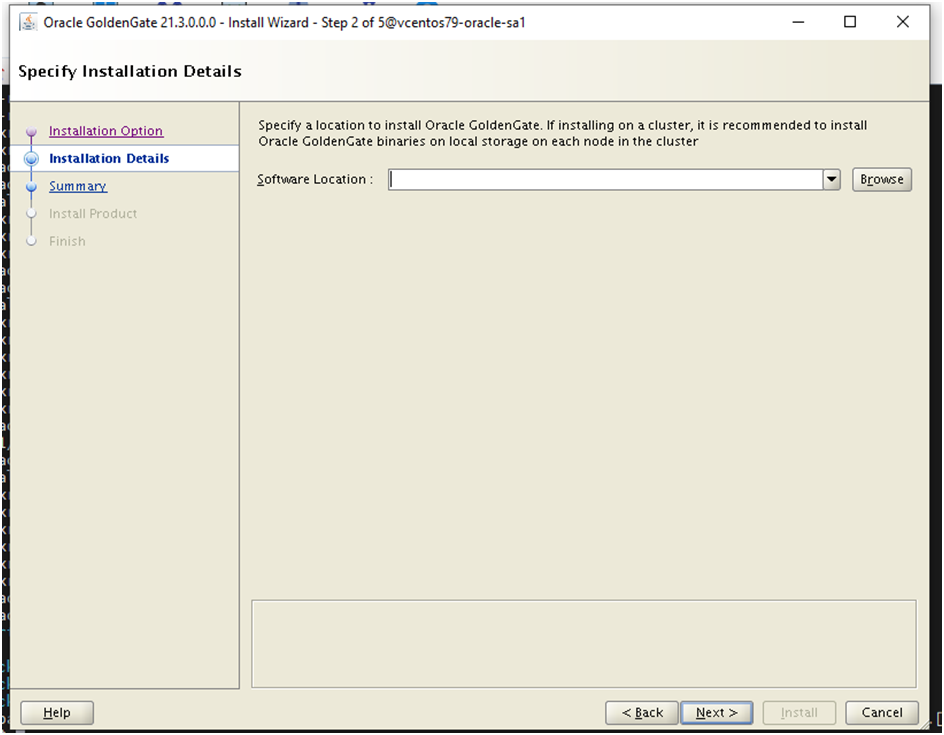
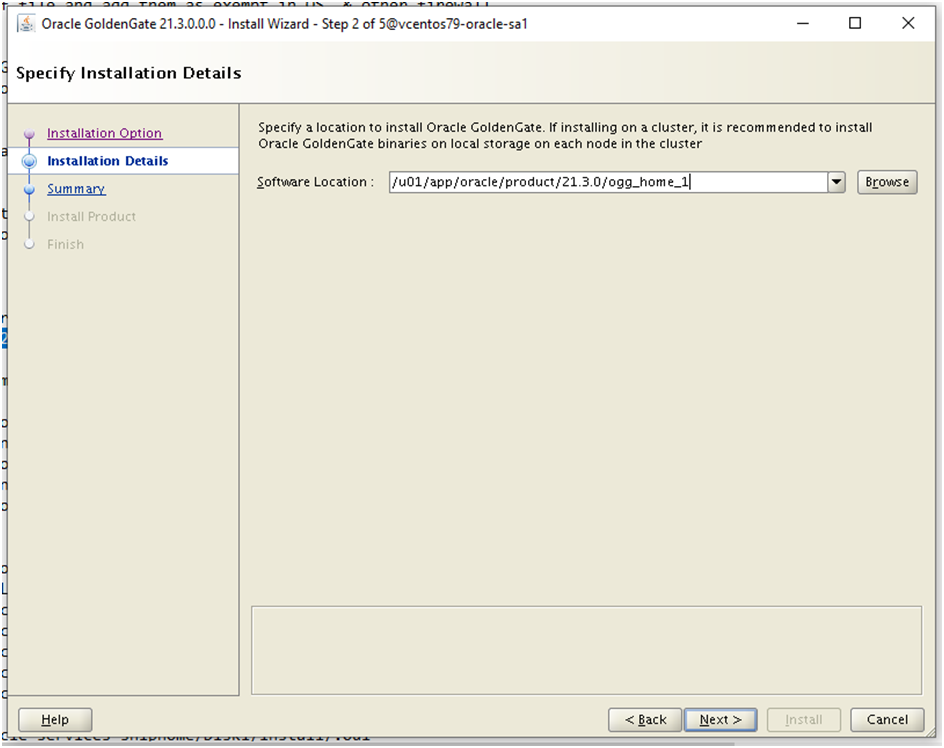
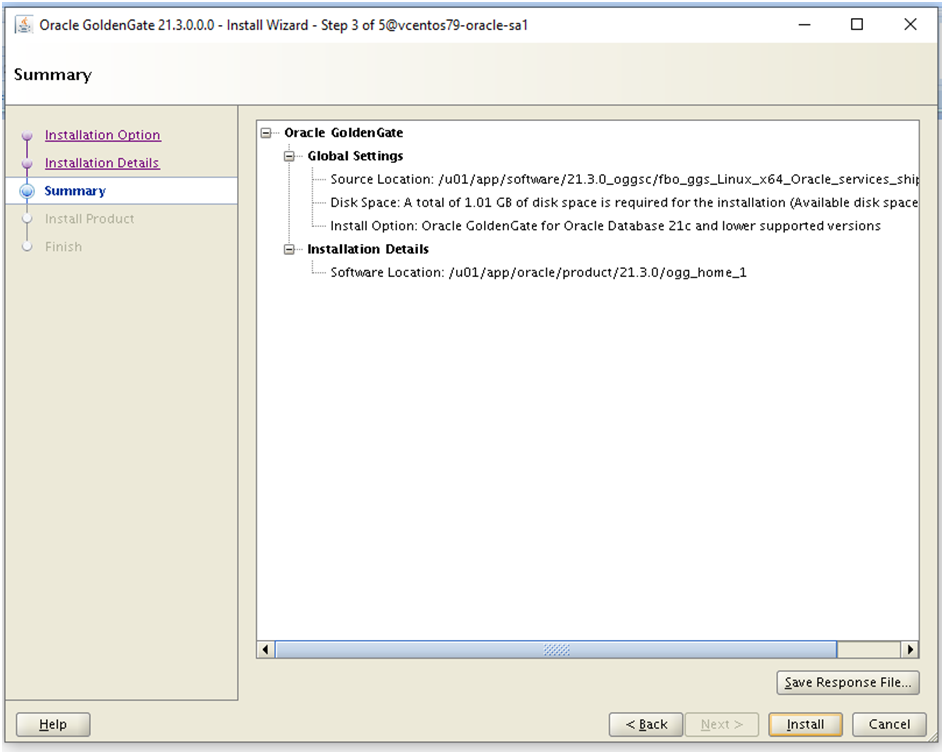
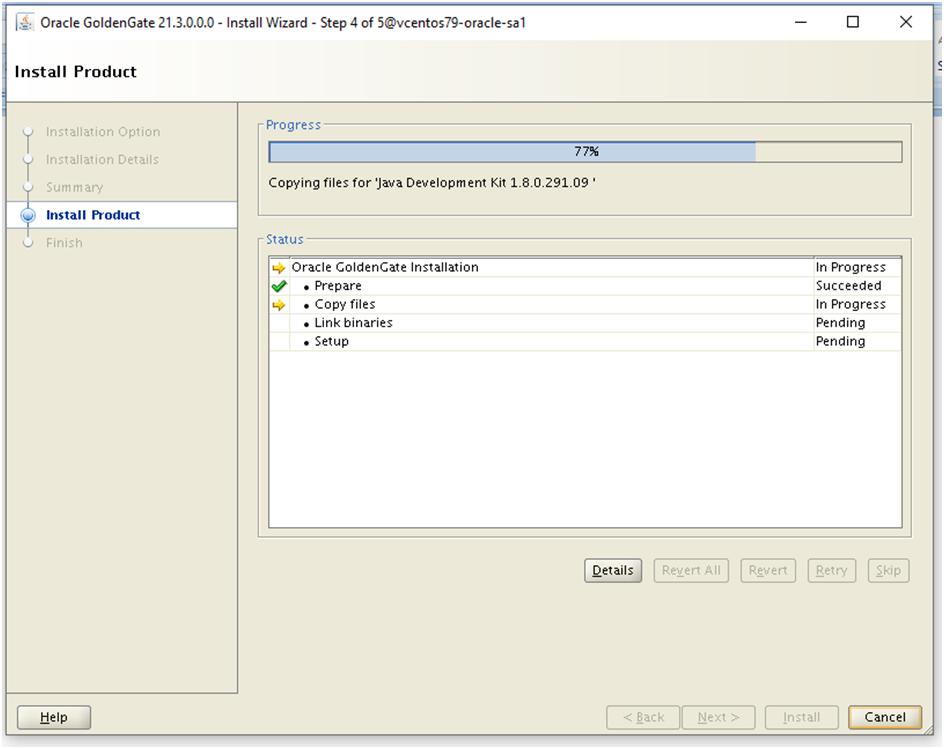
Install screenshots:


Install directory (/u01/app/oracle/product/21.3.0/ogg_home_1) is created before launching the runInstaller


Response file saved.


..only one parameter (GG_HOME, rest all comes from software, since we already downloaded GG for oracle). Install took – 1 min or less.

No prompt for /u01/app/oracle/product/21.3.0/ogg_home_1/root.sh script, since we used same account oracle for managing GG and Oracle DB

Install log snip:
INFO: Executing command find /u01/app/oraInventory/logs -type f -exec chmod  -f 0640 {} ";"
INFO: Current Inventory:
        Oracle Home: OraDB19Home1
                This Oracle Home has not been changed in this session.
        Oracle Home: OraHome1 <<< inventory is stored with GG Home info
                Java Development Kit 1.8.0.291.09
                oracle.swd.oui.core.min 12.2.0.9.0
                Installer SDK Component 12.2.0.9.0
                Oracle One-Off Patch Installer 12.2.0.1.17
                Oracle Universal Installer 12.2.0.9.0
                Oracle GoldenGate Services for Oracle Database 21c and lower supported versions 21.1.0.0.0
                oracle.swd.commonlogging 13.3.0.0.0
                oracle.swd.opatchautodb 12.2.0.1.5
                Oracle GoldenGate Services 21.1.0.0.0
INFO: OiicSaveInvWCCE:After saving the inventory. This is an Install session.
INFO: OiicSaveInvWCCE:After saving the inventory. The platform is unix.
INFO: OiicSaveInvWCCE:After saving the inventory. The location of root.sh is /u01/app/oracle/product/21.3.0/ogg_home_1/root.sh
INFO: Setting permission on dir : /u01/app/oracle/product/21.3.0/ogg_home_1/inventory
INFO: Executing command find /u01/app/oracle/product/21.3.0/ogg_home_1/inventory -type d -exec chmod  -f 0750 {} ";"
INFO: Executing command find /u01/app/oracle/product/21.3.0/ogg_home_1/inventory -type f -exec chmod  -f 0640 {} ";"
INFO: InstallProgressMonitor: Completed phase 16

How does the installed home looks:

[root@vcentos79-oracle-sa1 dba]# cd /u01/app/oracle/product/21.3.0/ogg_home_1
[root@vcentos79-oracle-sa1 ogg_home_1]# ls -altr
total 16
-rw-r-----.  1 oracle oinstall   51 Apr  6 19:35 oraInst.loc
drwxr-xr-x.  3 oracle oinstall   24 Jun 11 20:07 ..
drwxr-xr-x.  3 oracle oinstall   20 Jun 11 20:16 diagnostics
drwxr-xr-x.  3 oracle oinstall   19 Jun 11 20:16 srvm
drwxr-xr-x.  2 oracle oinstall   26 Jun 11 20:16 deinstall
drwxr-xr-x.  8 oracle oinstall 4096 Jun 11 20:16 lib
drwxr-xr-x.  2 oracle oinstall  127 Jun 11 20:16 jlib
drwxr-xr-x.  2 oracle oinstall   63 Jun 11 20:16 include
drwxr-xr-x.  7 oracle oinstall  247 Jun 11 20:16 jdk
drwxr-xr-x. 13 oracle oinstall 4096 Jun 11 20:16 OPatch
drwxr-xr-x.  2 oracle oinstall 4096 Jun 11 20:16 bin
drwxr-xr-x.  8 oracle oinstall  226 Jun 11 20:16 oui
drwxr-x---. 13 oracle oinstall  218 Jun 11 20:16 inventory
drwxr-xr-x.  3 oracle oinstall   28 Jun 11 20:16 install
drwxr-xr-x.  3 oracle oinstall   17 Jun 11 20:16 cfgtoollogs
drwxr-xr-x. 15 oracle oinstall  209 Jun 11 20:16 .
[root@vcentos79-oracle-sa1 ogg_home_1]

Exact size as what the insaller GUI asked for:

[root@vcentos79-oracle-sa1 ogg_home_1]# du -sh .
1.1G    .
[root@vcentos79-oracle-sa1 ogg_home_1]#

For silent install:

Please see below the difference between default response file and the one I generated during the install:
[root@vcentos79-oracle-sa1 dba]# diff oggcore.rsp /u01/app/software/21.3.0_oggsc/fbo_ggs_Linux_x64_Oracle_services_shiphome/Disk1/response/oggcore.rsp|grep -Ev -- "-|#"
2,16c2,16
19c19
32c32
34c34
< INSTALL_OPTION=ORA21c
> INSTALL_OPTION=
39,61c39
< SOFTWARE_LOCATION=/u01/app/oracle/product/21.3.0/ogg_home_1
<
< START_MANAGER=false
<
< MANAGER_PORT=Not applicable for a Services installation.
<
< DATABASE_LOCATION=Not applicable for a Services installation.
<
> SOFTWARE_LOCATION=
75c53
< INVENTORY_LOCATION=/u01/app/oraInventory
> INVENTORY_LOCATION=
78c56
82c60
< UNIX_GROUP_NAME=dba
\ No newline at end of file
> UNIX_GROUP_NAME=
[root@vcentos79-oracle-sa1 dba]#

So we will need the below in command line or in response file:

INSTALL_OPTION=ORA21c
SOFTWARE_LOCATION=/u01/app/oracle/product/21.3.0/ogg_home_1
START_MANAGER=false
INVENTORY_LOCATION=/u01/app/oraInventory
UNIX_GROUP_NAME=dba

Help menu of the runInstaller:

[oracle@vcentos79-oracle-sa1 Disk1]$ ./runInstaller -help
Preparing to launch Oracle Universal Installer from /tmp/OraInstall2023-06-11_08-34-20PM. Please wait ...Usage:  runInstaller [<flag>] [<option>]
Following are the possible flags:
        -help - display help.
        -silent - run in silent mode. The inputs can be a response file or a list of command line variable value pairs.
                [-ignorePrereqFailure - ignore all prerequisite checks failures.]
                [-lenientInstallMode - perform the best effort installation by automatically ignoring invalid data in input parameters.]
                [-showProgress - show the installation progress on the console. This option is supported for silent mode installation only.]
        -responseFile - specify the complete path of the response file to use.
        -invPtrLoc - point to a different inventory location. The orainst.loc file contains the location of the central inventory (inventory_loc) and the inventory group (inst_group).
        -jreLoc - specify the location for the jre used in the installation.
        -logLevel - enable the log of messages up to the priority level provided in this argument. Valid options are: severe, warning, info, config, fine, finer, finest.
        -paramFile - specify the location of the oraparam.ini file to be used in the installation.
        -executePrereqs | -executeConfigTools | -deinstall
        -executePrereqs - execute the prerequisite checks only.
        -executeConfigTools - execute the config tools for an installed home.
        -deinstall - uninstall the specified home.
        -debug - run in debug mode.
        -executeSysPrereqs - execute the system prerequisite checks and exit.
        -ignoreSysPrereqs - ignore the results of the system prerequisite checks.
        -printdiskusage - log the debug information for the disk usage.
        -printmemory - log the debug information for the memory usage.
        -waitForCompletion - wait for the completion of the installation, instead of spawning the installer and returning the console prompt.
        -suppressPreCopyScript - suppress the execution of the precopy script.
        -acceptUntrustedCertificates - accept untrusted certificates from a secure site.
        -suppressPostCopyScript - suppress the execution of the postcopy script.
        -noconfig - do not execute the config tools.
        -noconsole - suppress the display of messages in the console. The console is not allocated.
        -ignoreInternalDriverError - ignore any internal driver errors.
        -promptForPassword - provide the passwords on the console during a silent installation of an Oracle database.
        -remotecp - specify the path to the remote copy program on the local cluster node. Used only for cluster installs.
        -remoteshell - specify the path to the remote shell program on the local cluster node. Used only for cluster installs.


[oracle@vcentos79-oracle-sa1 Disk1]$

Oracle recommended method of silent install:

unzipped_directory/fbo_gg_Linux_x64_services_shiphome/Disk1/runInstaller -silent -nowait -responseFile absolute_path_to_response_file
So we prepare our response file with the values we got from the saved response file and reuse them as many as times needed in silent mode.
This closes the install Step.

Please refer to page the below page to know about GG software and program of oracle golden gate:

https://docs.oracle.com/en/middleware/goldengate/core/21.3/coredoc/overview-location-programs-and-utilities-accessible-admin-client.html#GUID-926E1D40-673A-4523-B60B-2C7415FFB7CA

Post Installation: NONE for oracle db deployments.


Oracle Golden Gate 21.3 MicroService Architecture - New Service Manager and Configuration Deployment Routine walk through

Deploy a new Oracle Golden Gate Service manager and configuration

Notes:

Deployment: config package addition to OGG microservice
Caution on first time deployment on a host: Secure or non-secure decision to be made
Secure Deployment: Uses SSL/TLS connections between DISTSERV and RECVSERV using server and client side certificates
Non Secure Deployment: Uses plaintext tx (REST API HTTP calls) between DISTSERV and RECVSERV without using any certificates
Local and Remote Deployments: Local, the OGG and DB are in same server vs in remote its on different server

Flow diagram:
OGGCA helps in performing the OGG deployments (add or create) -> OGG Deployment creates or modifies the service manager -> Service manager manages the deployments from then on

Prereqs:
1. Ensure to have OGG already installed.
2. before starting the OGGCA.sh, please ensure to add necessary space for the GG deployment

As root:
[root@vcentos79-oracle-sa1 ~]# vgs
  VG          #PV #LV #SN Attr   VSize   VFree
  appdata-vg    1   3   0 wz--n-  49.98g    5.98g <<< use the 5GB freespace to create a new lvg
  centos        1   2   0 wz--n- <19.00g       0
  ostmpswp-vg   1   2   0 wz--n-   7.98g 1008.00m
[root@vcentos79-oracle-sa1 ~]#

lvdisplay
lvcreate -L 1000 appdata-vg -n oggdata-lv

[root@vcentos79-oracle-sa1 ~]# lvcreate -L 1000 appdata-vg -n oggdata-lv
  Rounding up size to full physical extent 1008.00 MiB
  Logical volume "oggdata-lv" created.
[root@vcentos79-oracle-sa1 ~]#

mkfs.xfs /dev/appdata-vg/oggdata-lv

[root@vcentos79-oracle-sa1 ~]# mkfs.xfs /dev/appdata-vg/oggdata-lv
meta-data=/dev/appdata-vg/oggdata-lv isize=512    agcount=4, agsize=64512 blks
         =                       sectsz=512   attr=2, projid32bit=1
         =                       crc=1        finobt=0, sparse=0
data     =                       bsize=4096   blocks=258048, imaxpct=25
         =                       sunit=0      swidth=0 blks
naming   =version 2              bsize=4096   ascii-ci=0 ftype=1
log      =internal log           bsize=4096   blocks=855, version=2
         =                       sectsz=512   sunit=0 blks, lazy-count=1
realtime =none                   extsz=4096   blocks=0, rtextents=0

[root@vcentos79-oracle-sa1 ~]#
Add entry into /etc/fstab after a backup
Ex.:
/dev/appdata-vg/oggdata-lv /oggdata xfs defaults 0 0


mkdir /oggdata
mount /oggdata
chown oracle:dba /oggdata


Variables for OGG deployment:


export OGG_HOME=/u01/app/oracle/product/21.3.0/ogg_home_1
export TNS_ADMIN=/u01/app/oracle/product/19.0.0/db_1/network/admin
export LD_LIBRARY_PATH=${LD_LIBRARY_PATH}:${OGG_HOME}/lib/instantclient:${OGG_HOME}/lib
Service Manager Deployment home= /oggdata/oggsrvm01
Deployment name=oggdep01
Deployment Path=/oggdata/oggdep01
deployment user=ggsca
deployment pswd=ggsca
DBSchema=oggdep01schema
datastore home=/oggdata/oggdata01perf01

Install screenshot:

[oracle@vcentos79-oracle-sa1 bin]$ export OGG_HOME=/u01/app/oracle/product/21.3.0/ogg_home_1

[oracle@vcentos79-oracle-sa1 bin]$ export TNS_ADMIN=/u01/app/oracle/product/19.0.0/db_1/network/admin

[oracle@vcentos79-oracle-sa1 bin]$ export LD_LIBRARY_PATH=${LD_LIBRARY_PATH}:${OGG_HOME}/lib/instantclient:${OGG_HOME}/lib

[oracle@vcentos79-oracle-sa1 bin]$ ./oggca.sh


Filled one:


[root@vcentos79-oracle-sa1 ~]# netstat -plantu|grep 9100
[root@vcentos79-oracle-sa1 ~]# ls -ld /oggdata
drwxr-xr-x. 2 oracle dba 6 Jun 12 07:52 /oggdata
[root@vcentos79-oracle-sa1 ~]# df -h /oggdata
Filesystem                           Size  Used Avail Use% Mounted on
/dev/mapper/appdata--vg-oggdata--lv 1005M   33M  973M   4% /oggdata
 [root@vcentos79-oracle-sa1 ~]# ls -altr /oggdata
total 4
dr-xr-xr-x. 22 root   root 4096 Jun 12 07:50 ..
drwxr-xr-x.  2 oracle dba     6 Jun 12 07:52 .
[root@vcentos79-oracle-sa1 ~]#


Since we exported all necessary variables, this values are populated by default


I didn’t choose strong password


I haven’t got any certificates... so deploying this as non secure one.


[root@vcentos79-oracle-sa1 ~]# netstat -plantu|grep -E "9011|9012|9013|9014|9015"

[root@vcentos79-oracle-sa1 ~]#

Only enter first port# for admin services, rest all automatically populates in ascending order as directed in oracle guide.


An oracle DB schema, oracle wont connect here until we start extract process without source schema definition.Anyway we will create the schema in oracle DB with the name mentioned below.


Save the response file:


Prompt: /oggdata/oggsrvm01/bin/registerServiceManager.sh


[root@vcentos79-oracle-sa1 ~]# /oggdata/oggsrvm01/bin/registerServiceManager.sh

Copyright (c) 2017, 2020, Oracle and/or its affiliates. All rights reserved.

----------------------------------------------------

     Oracle GoldenGate Install As Service Script

----------------------------------------------------

OGG_HOME=/u01/app/oracle/product/21.3.0/ogg_home_1

OGG_CONF_HOME=/oggdata/oggsrvm01/etc/conf

OGG_VAR_HOME=/oggdata/oggsrvm01/var

OGG_USER=oracle

Running OracleGoldenGateInstall.sh...

Created symlink from /etc/systemd/system/multi-user.target.wants/OracleGoldenGate.service to /etc/systemd/system/OracleGoldenGate.service.

[root@vcentos79-oracle-sa1 ~]#


Post deployment the directories are looking like below:


[root@vcentos79-oracle-sa1 ~]# cd /oggdata

[root@vcentos79-oracle-sa1 oggdata]# ls -altr

total 4

dr-xr-xr-x. 22 root   root     4096 Jun 12 07:50 ..

drwxr-xr-x.  5 oracle dba        62 Jun 12 20:02 .

drwxr-x---.  4 oracle oinstall   28 Jun 12 20:02 oggdep01

drwxr-x---.  5 oracle oinstall   39 Jun 12 20:02 oggsrvm01

drwxr-x---.  3 oracle oinstall   25 Jun 12 20:02 oggdata01perf01

[root@vcentos79-oracle-sa1 oggdata]# ls -altr ogg*

oggdep01:

total 0

drwxr-xr-x. 5 oracle dba      62 Jun 12 20:02 ..

drwxr-x---. 4 oracle oinstall 29 Jun 12 20:02 etc

drwxr-x---. 4 oracle oinstall 28 Jun 12 20:02 .

drwxr-x---. 7 oracle oinstall 63 Jun 12 20:02 var


oggsrvm01:

total 0

drwxr-x---. 4 oracle oinstall 29 Jun 12 20:02 etc

drwxr-x---. 7 oracle oinstall 63 Jun 12 20:02 var

drwxr-xr-x. 5 oracle dba      62 Jun 12 20:02 ..

drwxr-x---. 2 oracle oinstall 39 Jun 12 20:02 bin

drwxr-x---. 5 oracle oinstall 39 Jun 12 20:02 .


oggdata01perf01:

total 0

drwxr-xr-x. 5 oracle dba       62 Jun 12 20:02 ..

drwxr-x---. 3 oracle oinstall  25 Jun 12 20:02 .

drwxr-x---. 2 oracle oinstall 259 Jun 12 20:02 metricstore

[root@vcentos79-oracle-sa1 oggdata]#


[root@vcentos79-oracle-sa1 oggdata]# df -h /oggdata

Filesystem                           Size  Used Avail Use% Mounted on

/dev/mapper/appdata--vg-oggdata--lv 1005M   76M  930M   8% /oggdata

[root@vcentos79-oracle-sa1 oggdata]#


Various ports status now:

[root@vcentos79-oracle-sa1 oggdata]# netstat -plantu|grep -E "9100|9011|9012|9013|9014|9015"

tcp        0      0 0.0.0.0:9100            0.0.0.0:*               LISTEN      14725/ServiceManage

tcp        0      0 0.0.0.0:9011            0.0.0.0:*               LISTEN      14501/adminsrvr

tcp        0      0 0.0.0.0:9012            0.0.0.0:*               LISTEN      14503/distsrvr

tcp        0      0 0.0.0.0:9013            0.0.0.0:*               LISTEN      14508/recvsrvr

tcp        0      0 0.0.0.0:9014            0.0.0.0:*               LISTEN      14540/pmsrvr

tcp6       0      0 :::9100                 :::*                    LISTEN      14725/ServiceManage

tcp6       0      0 :::9011                 :::*                    LISTEN      14501/adminsrvr

tcp6       0      0 :::9012                 :::*                    LISTEN      14503/distsrvr

tcp6       0      0 :::9013                 :::*                    LISTEN      14508/recvsrvr

tcp6       0      0 :::9014                 :::*                    LISTEN      14540/pmsrvr

udp        0      0 0.0.0.0:9013            0.0.0.0:*                           14508/recvsrvr

[root@vcentos79-oracle-sa1 oggdata]#


Add exemption or stop firewall in linux OS and try access the below url:

http://127.0.0.1:59100 (for me 59100 is forwarded to 9100)


Post login using ggsca user


The deployments can be seen and you can manage the status of the deployment and its services along with their config (like port, state – enabled/disabled etc..)


Note the response file values:


[oracle@vcentos79-oracle-sa1 ogg_home_1]$ cat /home/oracle/dba/oggca.rsp|grep -Ev '^#|^$|=""|=$'

oracle.install.responseFileVersion=/oracle/install/rspfmt_oggca_response_schema_v21_1_0

CONFIGURATION_OPTION=ADD

DEPLOYMENT_NAME=oggdep01

ADMINISTRATOR_USER=ggsca

SERVICEMANAGER_DEPLOYMENT_HOME=/oggdata/oggsrvm01

HOST_SERVICEMANAGER=127.0.0.1

PORT_SERVICEMANAGER=9100

SECURITY_ENABLED=false

STRONG_PWD_POLICY_ENABLED=false

CREATE_NEW_SERVICEMANAGER=true

REGISTER_SERVICEMANAGER_AS_A_SERVICE=true

INTEGRATE_SERVICEMANAGER_WITH_XAG=false

EXISTING_SERVICEMANAGER_IS_XAG_ENABLED=false

OGG_SOFTWARE_HOME=/u01/app/oracle/product/21.3.0/ogg_home_1

OGG_DEPLOYMENT_HOME=/oggdata/oggdep01

ENV_LD_LIBRARY_PATH=${OGG_HOME}/lib/instantclient:${OGG_HOME}/lib

ENV_TNS_ADMIN=/u01/app/oracle/product/19.0.0/db_1/network/admin

FIPS_ENABLED=false

SHARDING_ENABLED=false

ADMINISTRATION_SERVER_ENABLED=true

PORT_ADMINSRVR=9011

DISTRIBUTION_SERVER_ENABLED=true

PORT_DISTSRVR=9012

NON_SECURE_DISTSRVR_CONNECTS_TO_SECURE_RCVRSRVR=false

RECEIVER_SERVER_ENABLED=true

PORT_RCVRSRVR=9013

METRICS_SERVER_ENABLED=true

METRICS_SERVER_IS_CRITICAL=false

PORT_PMSRVR=9014

UDP_PORT_PMSRVR=9015

PMSRVR_DATASTORE_TYPE=BDB

PMSRVR_DATASTORE_HOME=/oggdata/oggdata01perf01

OGG_SCHEMA=oggdep01schema

[oracle@vcentos79-oracle-sa1 ogg_home_1]$


oggca.sh help menu:


[oracle@vcentos79-oracle-sa1 bin]$ ./oggca.sh -help

Usage:  oggca.sh [<flag>]

Following are the possible flags:

        -help - display help.

        -silent - run in silent mode. The inputs can be a response file or a list of command line variable value pairs.

        -responseFile - specify the complete path of the response file to use.

        -debug - run in debug mode.


[oracle@vcentos79-oracle-sa1 bin]$ ./oggca.sh -silent -help

Usage:  oggca.sh [<flag>]

Following are the possible flags:

        -help - display help.

        -silent - run in silent mode. The inputs can be a response file or a list of command line variable value pairs.

        -responseFile - specify the complete path of the response file to use.

        -debug - run in debug mode.


[oracle@vcentos79-oracle-sa1 bin]$


OKV platform certificate rotation - pitfall , awareness!!!!

OKV version: 21.9 Setup: Multimaster R/W cluster Plan: https://docs.google.com/spreadsheets/d/e/2PACX-1vSaXXTjj9cE1fvYpNmsDNBOkTIw78yTwQ6a9o...