Wednesday, December 14, 2022

Windows pg_hba.conf issue - FATAL: could not load pg_hba.conf

 Error or issue:

-bash-4.2$ psql -U barman -h 10.0.2.5 -p 5432 -d postgres
psql: error: connection to server at "10.0.2.5", port 5432 failed: FATAL:  could not load pg_hba.conf
You have new mail in /var/spool/mail/barman
-bash-4.2$


Issue:

An entry of the below form added

host    all barman              10.0.2.9 trust
host    all streaming_barman    10.0.2.9 trust

Actual entry should look like below (FIX):

host    all barman              10.0.2.9/32 trust
host    all streaming_barman    10.0.2.9/32 trust


Test:

-bash-4.2$ psql -U barman -h 10.0.2.5 -p 5432 -d postgres
psql (15.1, server 14.6)
Type "help" for help.

postgres=# exit

All looks good now.

Postgres expects subnet mask to be part of the host entry.

If you make an invalid entry in pg_hba.conf. Try reload the postgresql db and check the postgres log to know which line has issues...


Error log which gave the clue:

2022-12-14 12:47:37.105 PST [3560] LOG:  received SIGHUP, reloading configuration files
2022-12-14 12:47:37.112 PST [3560] LOG:  parameter "archive_mode" cannot be changed without restarting the server
2022-12-14 12:47:37.113 PST [3560] LOG:  configuration file "C:/Users/Administrator/PostgreSQL/14/data/postgresql.conf" contains errors; unaffected changes were applied
2022-12-14 12:47:37.114 PST [3560] LOG:  invalid IP mask "trust": Unknown host
2022-12-14 12:47:37.114 PST [3560] CONTEXT:  line 96 of configuration file "C:/Users/Administrator/PostgreSQL/14/data/pg_hba.conf"
2022-12-14 12:47:37.114 PST [3560] LOG:  pg_hba.conf was not reloaded


That was a quick post!!


Thanks

Saturday, November 26, 2022

Using pg_dump & pg_restore to backup & restore a database in postgres (including permission verify)

 Dears,


In this blog, we will backup/restore a database. In addition we will also verify if the permission we granted to an object in the database to an user is restored properly or not.


Steps @ highlevel:

Create a DB
Grant permisson to a user in a schema present in the db
pg_dump to back it up
Drop the DB
Then try restoring the DB using pg_restore
Check the user permisson

Setup:
Create a database:

postgres=# create database pgdmptst;
CREATE DATABASE
postgres=#

Connect to the db:

postgres=# \c pgdmptst
You are now connected to database "pgdmptst" as user "postgres".
pgdmptst=#

Create a schema:

pgdmptst=# create schema sch_pgdmptst;
CREATE SCHEMA
pgdmptst=#

Create a table:

create table sch_pgdmptst.pgtst_tbl1
(
id int PRIMARY KEY
,name text
);
INSERT INTO sch_pgdmptst.pgtst_tbl1
SELECT i, lpad('TST',mod(i,100),'CHK')
FROM generate_series (1,10000) s(i);

pgdmptst=# create table sch_pgdmptst.pgtst_tbl1
pgdmptst-# (
pgdmptst(# id int PRIMARY KEY
pgdmptst(# ,name text
pgdmptst(# );
CREATE TABLE

pgdmptst=# INSERT INTO sch_pgdmptst.pgtst_tbl1
pgdmptst-# SELECT i, lpad('TST',mod(i,100),'CHK')
pgdmptst-# FROM generate_series (1,10000) s(i);
INSERT 0 10000

pgdmptst=# select count(1) from sch_pgdmptst.pgtst_tbl1;
 count
-------
 10000
(1 row)
pgdmptst=#

Grant permission:

pgdmptst=# grant select on sch_pgdmptst.pgtst_tbl1 to barman;
GRANT
pgdmptst=#

Now let us backup this schema:

https://www.postgresql.org/docs/current/app-pgdump.html

Option: -Fc

pg_dump -Fc pgdmptst >/pgBACKUP/pgdump/26nov22_pgdmptst_scn1.dmp

-bash-4.2$ pg_dump -Fc pgdmptst >/pgBACKUP/pgdump/26nov22_pgdmptst_scn1.dmp
-bash-4.2$ ls -altr
total 36
drwxr-xr-x. 3 postgres postgres    20 Nov 26 16:40 ..
drwxr-xr-x. 2 postgres postgres    39 Nov 26 16:40 .
-rw-r--r--. 1 postgres postgres 33574 Nov 26 16:40 26nov22_pgdmptst_scn1.dmp
-bash-4.2$

Let us drop the database:

postgres=# drop database pgdmptst;
DROP DATABASE
postgres=#

Check if the database is no more:

postgres=# \l
                                                 List of databases
   Name    |  Owner   | Encoding |   Collate   |    Ctype    | ICU Locale | Locale Provider |   Access privileg
es
-----------+----------+----------+-------------+-------------+------------+-----------------+------------------
-----
 pgtst_db  | postgres | UTF8     | en_US.UTF-8 | en_US.UTF-8 |            | libc            |
 postgres  | postgres | UTF8     | en_US.UTF-8 | en_US.UTF-8 |            | libc            |
 template0 | postgres | UTF8     | en_US.UTF-8 | en_US.UTF-8 |            | libc            | =c/postgres
    +
           |          |          |             |             |            |                 | postgres=CTc/post
gres
 template1 | postgres | UTF8     | en_US.UTF-8 | en_US.UTF-8 |            | libc            | =c/postgres
    +
           |          |          |             |             |            |                 | postgres=CTc/post
gres
(4 rows)
postgres=#

Restore the database:

Command:
pg_restore -C -d postgres 26nov22_pgdmptst_scn1.dmp --verbose

Actual output:

-bash-4.2$ pg_restore -C -d postgres 26nov22_pgdmptst_scn1.dmp --verbose
pg_restore: connecting to database for restore
pg_restore: creating DATABASE "pgdmptst"
pg_restore: connecting to new database "pgdmptst"
pg_restore: creating SCHEMA "sch_pgdmptst"
pg_restore: creating TABLE "sch_pgdmptst.pgtst_tbl1"
pg_restore: processing data for table "sch_pgdmptst.pgtst_tbl1"
pg_restore: creating CONSTRAINT "sch_pgdmptst.pgtst_tbl1 pgtst_tbl1_pkey"
pg_restore: creating ACL "sch_pgdmptst.TABLE pgtst_tbl1"

Verify the restore:

-bash-4.2$ psql
psql (15.0)
Type "help" for help.
postgres=# \c pgdmptst
You are now connected to database "pgdmptst" as user "postgres".

pgdmptst=# \dt
Did not find any relations.

pgdmptst=# \dn
         List of schemas
     Name     |       Owner
--------------+-------------------
 public       | pg_database_owner
 sch_pgdmptst | postgres
(2 rows)

pgdmptst=# set search_path='sch_pgdmptst';
SET

pgdmptst=# select count(1) from pgtst_tbl1;
 count
-------
 10000
(1 row)

pgdmptst=#

Now let us examine if barman has its permisson restored...

Command: select * from information_schema.table_privileges where lower(grantee)='barman';

pgdmptst=# select * from information_schema.table_privileges where lower(grantee)='barman';
 grantor  | grantee | table_catalog | table_schema | table_name | privilege_type | is_grantable | with_hierarch
y
----------+---------+---------------+--------------+------------+----------------+--------------+--------------
--
 postgres | barman  | pgdmptst      | sch_pgdmptst | pgtst_tbl1 | SELECT         | YES          | YES
(1 row)
pgdmptst=#

So the barman permisson is back :)

This closes this blog.

Thanks

Sunday, November 20, 2022

Virtualbox - NatNetwork - 2 VMs - same IP!!!!!

 Dears,

When we setup VMs using virtualbox or vagrant, we tend to clone a virtual machine. It results in copying the MAC address too!

When MAC is same, even if you choose to use NatNetwork, you will see same ip address for your machines (more than 1), ideally this shouldnt be the case.

So your expected to see the ip as 10.0.2.15 in all the machines!!!

If you refresh the mac address (to generate a unique MAC) using virtualbox or in vagrant you assign a different mac for each machine, you wont face this issue.

Post fixing the issue... you will see something like below on each machine. In my case I had 2 VMs and they are...

Machine 1:

   Link-local IPv6 Address . . . . . : fe80::a912:eb77:1d9d:8b23%6(Preferred)
   IPv4 Address. . . . . . . . . . . : 10.0.2.4(Preferred)
   Subnet Mask . . . . . . . . . . . : 255.255.255.0
   Lease Obtained. . . . . . . . . . : Sunday, November 20, 2022 4:01:14 AM
   Lease Expires . . . . . . . . . . : Sunday, November 20, 2022 4:11:10 AM
   Default Gateway . . . . . . . . . : 10.0.2.1
   DHCP Server . . . . . . . . . . . : 10.0.2.3
   DHCPv6 IAID . . . . . . . . . . . : 101187623
   DHCPv6 Client DUID. . . . . . . . : 00-01-00-01-2B-0B-CF-45-08-00-27-18-F7-A7
   DNS Servers . . . . . . . . . . . : 192.168.0.1
   NetBIOS over Tcpip. . . . . . . . : Enabled

Machine 2:

   Link-local IPv6 Address . . . . . : fe80::bdcf:6576:eb04:41e%6(Preferred)
   IPv4 Address. . . . . . . . . . . : 10.0.2.5(Preferred)
   Subnet Mask . . . . . . . . . . . : 255.255.255.0
   Lease Obtained. . . . . . . . . . : Sunday, November 20, 2022 4:11:11 AM
   Lease Expires . . . . . . . . . . : Sunday, November 20, 2022 4:21:11 AM
   Default Gateway . . . . . . . . . : 10.0.2.1
   DHCP Server . . . . . . . . . . . : 10.0.2.3
   DHCPv6 IAID . . . . . . . . . . . : 101187623
   DHCPv6 Client DUID. . . . . . . . : 00-01-00-01-2B-0C-42-2B-08-00-27-85-52-F1
   DNS Servers . . . . . . . . . . . : 192.168.0.1
   NetBIOS over Tcpip. . . . . . . . : Enabled

Note that we have 2 IPv4 addresses now for 2 machines.

Thanks

Saturday, November 19, 2022

Install PostgreSQL 14.6.1 on windows 2019 datacenter edition

 Dears,

Linux all this time, now my work requires me practise a windows setup of PostgreSQL. Hence I am writing this blog to show you how to setup PostgreSQL on windows 2019 datacenter edition (I used windows evaluation one).

To setup windows in vagrant, I used one of the public boxes available in vagrant public cloud....

url: https://app.vagrantup.com/StefanScherer/boxes/windows_2019


As usual I created my jump link to support the windows 2019 vm, as you see below...

1) Directory C:\VBoxVms\vagrant_home\vwin2019_postgres is created

2) Ran the below command... to create a jump link

mklink /j C:\cygwin64\home\rajalab\dba\vwin2019_postgres C:\VBoxVms\vagrant_home\vwin2019_postgres

3) Navigate to the jump link we created in cygwin64 terminal....

rajalab@<machinename> ~/dba/vwin2019_postgres

$ pwd

/home/rajalab/dba/vwin2019_postgres

rajalab@<machinename> ~/dba/vwin2019_postgres

4) Created the vagrant file with the below contents

Vagrantfile content:

Vagrant.configure("2") do |config|
  config.vm.box = "StefanScherer/windows_2019"
end

5) Launch "vagrant up" command

rajalab@<MachineName> ~/dba/vwin2019_postgres
$ vagrant up
Bringing machine 'default' up with 'virtualbox' provider...
==> default: Box 'StefanScherer/windows_2019' could not be found. Attempting to find and install...
    default: Box Provider: virtualbox
    default: Box Version: >= 0
==> default: Loading metadata for box 'StefanScherer/windows_2019'
    default: URL: https://vagrantcloud.com/StefanScherer/windows_2019
==> default: Adding box 'StefanScherer/windows_2019' (v2021.05.15) for provider: virtualbox
    default: Downloading: https://vagrantcloud.com/StefanScherer/boxes/windows_2019/versions/2021.05.15/providers/virtualbox.box
Download redirected to host: vagrantcloud-files-production.s3-accelerate.amazonaws.com
    default:
==> default: Successfully added box 'StefanScherer/windows_2019' (v2021.05.15) for 'virtualbox'!
==> default: Importing base box 'StefanScherer/windows_2019'...
==> default: Matching MAC address for NAT networking...
==> default: Checking if box 'StefanScherer/windows_2019' version '2021.05.15' is up to date...
==> default: Setting the name of the VM: vwin2019_postgres_default_1668863526676_75065
==> default: Clearing any previously set network interfaces...
==> default: Preparing network interfaces based on configuration...
    default: Adapter 1: nat
==> default: Forwarding ports...
    default: 3389 (guest) => 3389 (host) (adapter 1)
    default: 5985 (guest) => 55985 (host) (adapter 1)
    default: 5986 (guest) => 55986 (host) (adapter 1)
    default: 22 (guest) => 2222 (host) (adapter 1)
==> default: Running 'pre-boot' VM customizations...
==> default: Booting VM...
==> default: Waiting for machine to boot. This may take a few minutes...
    default: WinRM address: 127.0.0.1:55985
    default: WinRM username: vagrant
    default: WinRM execution_time_limit: PT2H
    default: WinRM transport: negotiate
Timed out while waiting for the machine to boot. This means that
Vagrant was unable to communicate with the guest machine within
the configured ("config.vm.boot_timeout" value) time period.

If you look above, you should be able to see the error(s) that
Vagrant had when attempting to connect to the machine. These errors
are usually good hints as to what may be wrong.

If you're using a custom box, make sure that networking is properly
working and you're able to connect to the machine. It is a common
problem that networking isn't setup properly in these boxes.
Verify that authentication configurations are also setup properly,
as well.

If the box appears to be booting properly, you may want to increase
the timeout ("config.vm.boot_timeout") value.

rajalab@<MachineName> ~/dba/vwin2019_postgres

Please ignore the messages like vagrant isnt able to communicate with the machine in specified interval.
The windows 2019 datacentre edition came online fine. I noticed it in the virtualbox console.


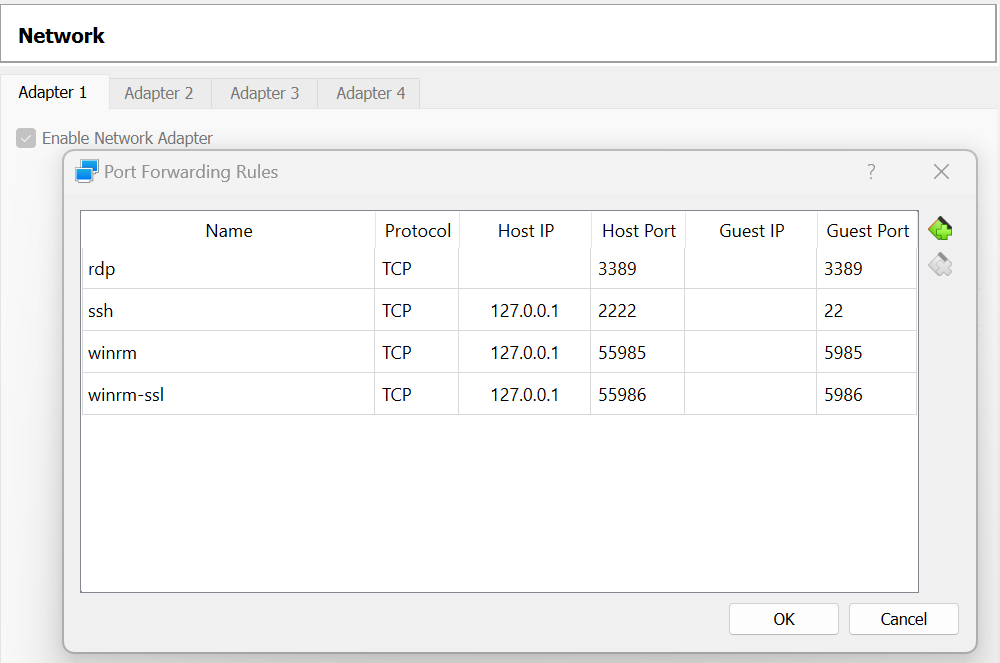
The virtual box console allowed me to connect for the first time without any credentials. Hence I reset the administrator account credentials and used rdp to perform rest of the work. Please note by default vagrant when booted the windows vm, it created port forwarding rules as you see below. Hence the rdp port is retained as is, since the local laptop is a windows 11 home edition and it doesnt support rdp. Hence using the port 3389 in both host and guest makes the rdp access bit easier.


Ok, the rdp works fine. This closes the vagrant part of the windows VM setup. Now we need to look at our real PostgreSQL setup. Please download and install chrome. I upsized the vm memory by 3 more GBs. So I have 5GB memory allocated to the vm.

PostgreSQL setup on windows 2019 datacenter edition:

Path standard I followed are...
PGBIN: C:\Program Files\PostgreSQL\14
PGDATA: C:\Users\Administrator\PostgreSQL\14\data

1) Download the PostgreSQL installer from postgresql.org, it will redirect you to the edb website as shown below...

url we landed on: https://www.enterprisedb.com/downloads/postgres-postgresql-downloads

2) On completion of download...


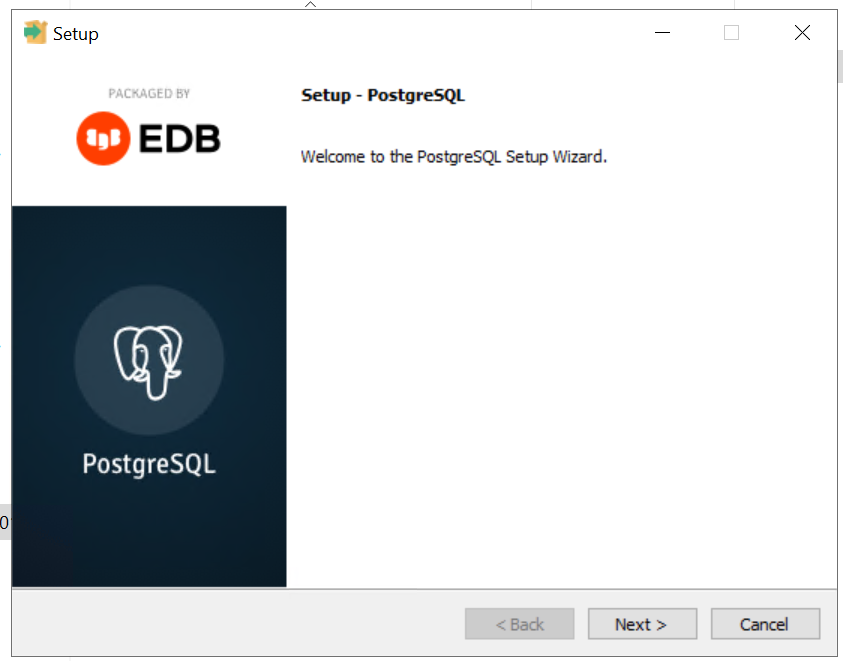
3) Since we logged in as administrator, we can initiate the PostgreSQL install...


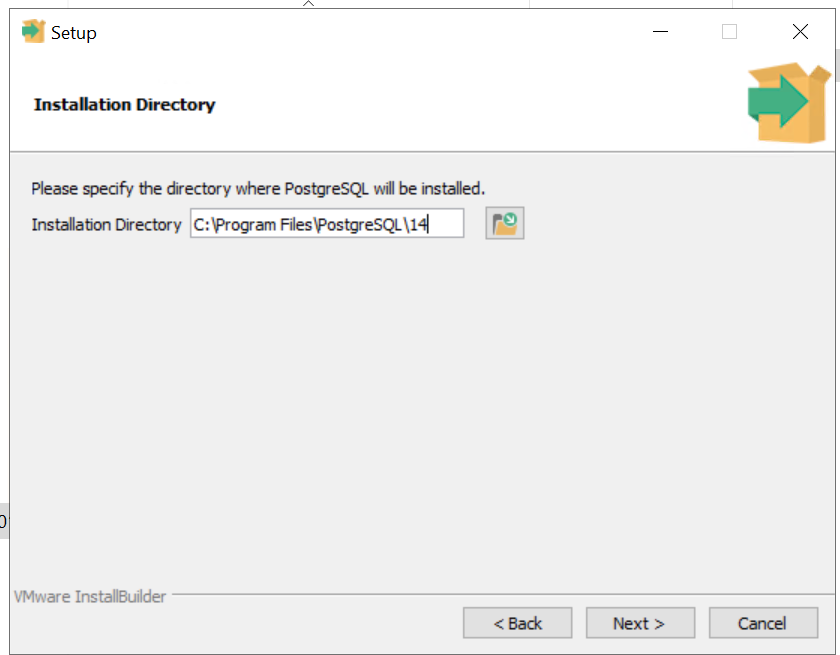
4)  The PGBIN path can be seen here...


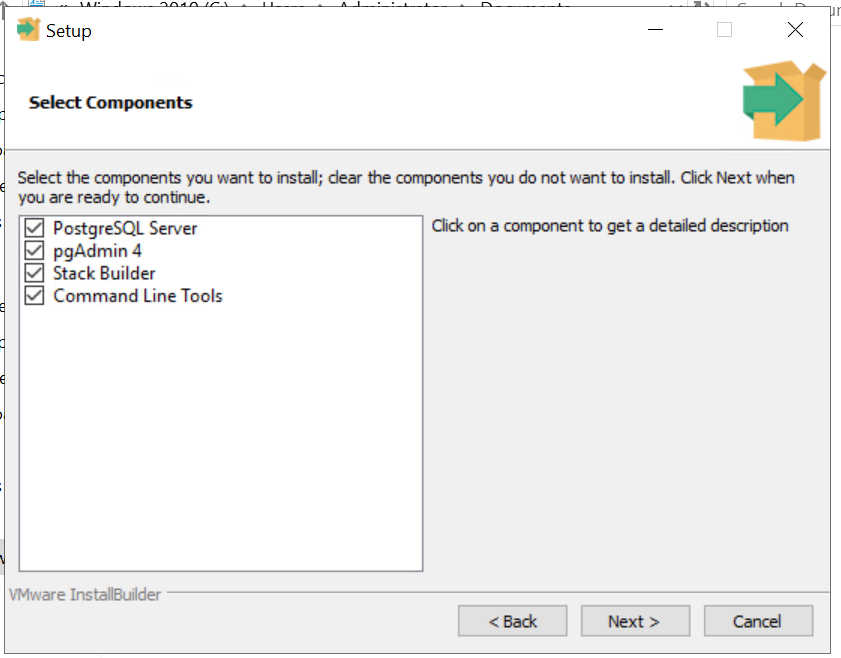
5)  On clicking next, we will notice the list of additional components that gets installed. Leave them selected.


6) On clicking next, we will be prompted to enter the PGDATA directory, see below I have updated it to the path we mentioned above. By default PGDATA will stay inside the PGBIN path.


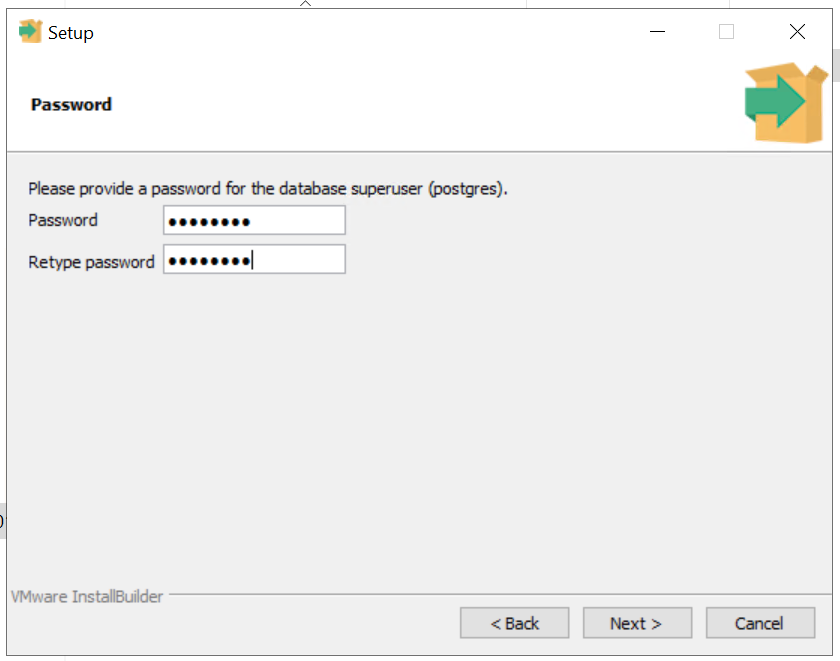
7) Please enter the postgres (the super user in postgres database) password...


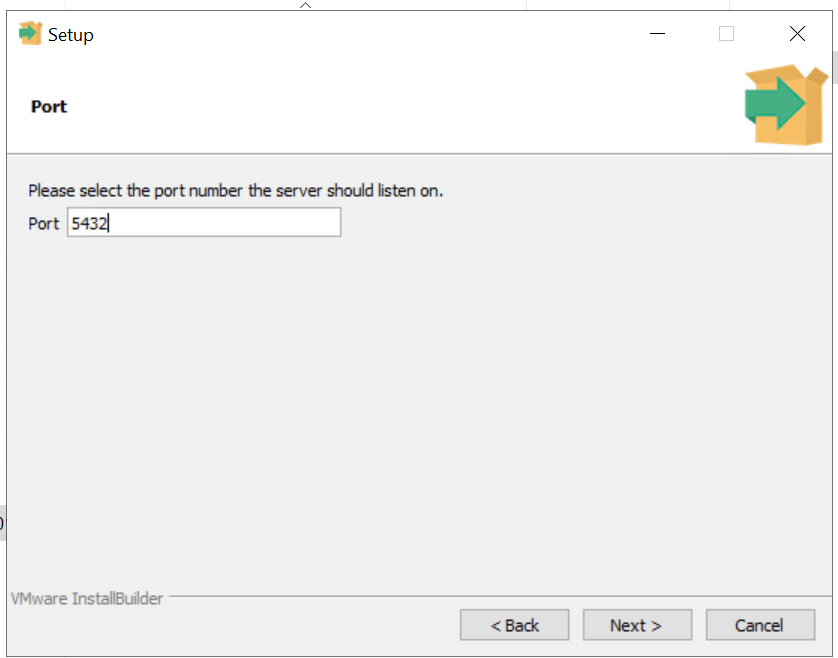
8) On clicking next, we can mention the port number on which postgresql will listen for connections incoming...


9) On the next screen we can see an option to change the "Locale" option, by default it will use the host OS locale setting, which by default points to Eng-US.


10) On clicking next, we can see the installation summary coming up... here you notice the PGBIN and PGDATA paths along with service name, that will be visible in services.msc.


11) On clicking next, it double confirms for the install to be kicked off...


12) Install kicked off...Time now: 7:10PM


13) Install inprogress... Time now: 7:13PM 


14) Installation finished. Time now: 07:16PM.


15) So in summary it took 6 mins on SSD with 5GB memory to complete the install. Please cancel the next screen and complete the install.


Post install verification:

1) psql command not found error!!!

C:\Users\Administrator>psql
'psql' is not recognized as an internal or external command,
operable program or batch file.

C:\Users\Administrator>

2) So we go the %PGBIN%\bin path and launch the psql.exe command. See below...

C:\Program Files\PostgreSQL\14\bin>psql -U postgres -d postgres
Password for user postgres:
psql (14.6)
WARNING: Console code page (437) differs from Windows code page (1252)
         8-bit characters might not work correctly. See psql reference
         page "Notes for Windows users" for details.
Type "help" for help.
postgres=#

3) We check data_directory to be sure, it is accurate...

postgres=# \l

                                                 List of databases

   Name    |  Owner   | Encoding |          Collate           |           Ctype            |   Access privileges

-----------+----------+----------+----------------------------+----------------------------+-----------------------

 postgres  | postgres | UTF8     | English_United States.1252 | English_United States.1252 |

 template0 | postgres | UTF8     | English_United States.1252 | English_United States.1252 | =c/postgres          +

           |          |          |                            |                            | postgres=CTc/postgres

 template1 | postgres | UTF8     | English_United States.1252 | English_United States.1252 | =c/postgres          +

           |          |          |                            |                            | postgres=CTc/postgres

(3 rows)

postgres=# show data_directory;

              data_directory

-------------------------------------------

 C:/Users/Administrator/PostgreSQL/14/data

(1 row)

postgres=#


4) Let us examine the service status...


This closes this blog. We have setup postgresql cluster on windows 2019 datacenter edition machine.

Thanks for your visit. Welcome back again.


Monday, October 31, 2022

Postgresql: Command runbook for DBA

Postgresql runbook for a DBA:

Steps to perform "cluster" command in postgres.... after brief data collection


Ensure to enable putty log...

1) Connect to postgres user:
command:
su - postgres

2) Find out the postgres process running:
command:
ps -ef|grep -i postgres

3) echo $PATH and $PGDATA variable
command:
echo $PATH
echo $PGDATA

4) Find out the location of psql
command:
which psql

5) Collect the cron job details
command:
crontab -l

6) Collect df -h output
command:
df -h

7) Connect to psql
command:
psql

8) Collect the db list
command:
\l
or 

select a.oid
,a.datname
,b.rolname owner
,a.encoding
,a.dattablespace
,a.datcollate
,a.datctype
,a.datacl
from pg_database a
,pg_authid b
where b.oid=a.datdba;

9) Connect to the db where the table is located
command:
\c <dbname>

10) View the schema list
command:
select * from pg_catalog.pg_namespace;
or
\dn+

11) show your search path first
command:
show search_path;

12) Set the search path the candidate schema
command:
SET search_path TO <candidate_schema>;

13) show your search path again [remember not to disconnect or exit this connection]
command:
show search_path;

14) List the tables along with their sizes
command:
\d+

15) Collect more details on the table
command:
select schemaname,tablename,tableowner,hasindexes from pg_tables where schemaname='<candidate_schema>' order by 1;

select relname table_name
,relnamespace schema_name
,reltype relation_type
,relowner owner
,relpages pages_or_blocks
,reltuples numrows
,relhasindex has_index
from pg_class
where relnamespace=(select oid from pg_namespace where nspname=<candidate_schema>')
and relname='<candidate_table>' order by 2,1;

16) Take description details
command:
\d <candidate table_name>;

17) Let us examine the index status
command:
select c.schemaname
,c.tablename
,c.indexname
,b.indisunique
,b.indisprimary
,b.indisclustered
,b.indisvalid
,b.indisready
,b.indislive
from pg_class a
,pg_index b
,pg_indexes c
,pg_namespace d
where d.nspname='<candidate_schema>'
and c.schemaname=d.nspname
and c.tablename='<candidate_table>'
and c.indexname=a.relname
and a.oid=b.indexrelid
and a.relnamespace=d.oid
;

18) Now secure backup of the candidate table [in case needed, we can revert both table structure and data]
command:
pg_dump -U <candidate_username> -d <candidate_database> -t <candidate_schema>.<candidate_table> > <candidate_mountspace>/pgtst_schema_pgtst_tbl2.sql

19) Let us run cluster command: << outage begins here
command:
Connect back to the same db;
SET search_path TO <candidate_schema>;
cluster verbose <candidate_schemaname>.<candidate_tablename> using <candidate_index>;

20) Let us run analyze
command:
Connect back to the same db;
SET search_path TO <candidate_schema>;
analyze verbose <candidate_schemaname>.<candidate_tablename>;

20) Let us examine the index status again
command:
Connect back to the same db;
SET search_path TO <candidate_schema>;

select c.schemaname
,c.tablename
,c.indexname
,b.indisunique
,b.indisprimary
,b.indisclustered
,b.indisvalid
,b.indisready
,b.indislive
from pg_class a
,pg_index b
,pg_indexes c
,pg_namespace d
where d.nspname='<candidate_schema>'
and c.schemaname=d.nspname
and c.tablename='<candidate_table>'
and c.indexname=a.relname
and a.oid=b.indexrelid
and a.relnamespace=d.oid
;

21) Let us examine the table status again
command:
Connect back to the same db;
SET search_path TO <candidate_schema>;
select schemaname,tablename,tableowner,hasindexes from pg_tables where schemaname='<candidate_schema>' order by 1;

select relname table_name
,relnamespace schema_name
,reltype relation_type
,relowner owner
,relpages pages_or_blocks
,reltuples numrows
,relhasindex has_index
from pg_class
where relnamespace=(select oid from pg_namespace where nspname='pgtst_schema')
and relname='<candidate_table>' order by 2,1;

\dn+

This closes the command summary for clustering operation.

Tuesday, October 25, 2022

postgresql physical backup - BARMAN

Objective: In this blog, we will examine the steps involved in barman backup configuration.


BARMAN has to be installed in a seperate server than the postgresql server.
Since my machine is very small in size, I installed barman on the same machine as postgresql server.
As per instruction from https://www.digitalocean.com/community/tutorials/how-to-back-up-restore-and-migrate-postgresql-databases-with-barman-on-centos-7
We already have postgresql server installed (version 15). Also we have epel and postgresql yum repos needed for this install step (see the packages downloaded were from either base, epel or pgdg-common).
We just need to install barman using yum install...

Actual output:

[root@10 ~]# yum install barman
Loaded plugins: fastestmirror
Loading mirror speeds from cached hostfile
epel/x86_64/metalink                                                                               | 6.1 kB  00:00:00
 * base: centos.excellmedia.net
 * epel: mirrors.bestthaihost.com
 * extras: centos.excellmedia.net
 * updates: centos.excellmedia.net
base                                                                                               | 3.6 kB  00:00:00
epel                                                                                               | 4.7 kB  00:00:00
extras                                                                                             | 2.9 kB  00:00:00
pgdg-common/7/x86_64/signature                                                                     |  198 B  00:00:00
pgdg-common/7/x86_64/signature                                                                     | 2.9 kB  00:00:00 !!!
pgdg10/7/x86_64/signature                                                                          |  198 B  00:00:00
pgdg10/7/x86_64/signature                                                                          | 3.6 kB  00:00:00 !!!
pgdg11/7/x86_64/signature                                                                          |  198 B  00:00:00
pgdg11/7/x86_64/signature                                                                          | 3.6 kB  00:00:00 !!!
pgdg12/7/x86_64/signature                                                                          |  198 B  00:00:00
pgdg12/7/x86_64/signature                                                                          | 3.6 kB  00:00:00 !!!
pgdg13/7/x86_64/signature                                                                          |  198 B  00:00:00
pgdg13/7/x86_64/signature                                                                          | 3.6 kB  00:00:00 !!!
pgdg14/7/x86_64/signature                                                                          |  198 B  00:00:00
pgdg14/7/x86_64/signature                                                                          | 3.6 kB  00:00:00 !!!
pgdg15/7/x86_64/signature                                                                          |  198 B  00:00:00
pgdg15/7/x86_64/signature                                                                          | 3.6 kB  00:00:00 !!!
updates                                                                                            | 2.9 kB  00:00:00
(1/8): pgdg10/7/x86_64/primary_db                                                                  | 396 kB  00:00:12
(2/8): pgdg11/7/x86_64/primary_db                                                                  | 440 kB  00:00:13
(3/8): pgdg13/7/x86_64/primary_db                                                                  | 224 kB  00:00:02
(4/8): pgdg14/7/x86_64/primary_db                                                                  | 146 kB  00:00:01
(5/8): pgdg15/7/x86_64/primary_db                                                                  |  56 kB  00:00:00
(6/8): pgdg12/7/x86_64/primary_db                                                                  | 326 kB  00:00:17
(7/8): epel/x86_64/primary_db                                                                      | 7.0 MB  00:00:29
(8/8): epel/x86_64/updateinfo                                                                      | 1.0 MB  00:04:03
Resolving Dependencies
--> Running transaction check
---> Package barman.noarch 0:3.2.0-1.rhel7 will be installed
--> Processing Dependency: python-barman = 3.2.0 for package: barman-3.2.0-1.rhel7.noarch
--> Processing Dependency: rsync >= 3.0.4 for package: barman-3.2.0-1.rhel7.noarch
--> Running transaction check
---> Package python-barman.noarch 0:3.2.0-1.rhel7 will be installed
--> Processing Dependency: python-psycopg2 >= 2.4.2 for package: python-barman-3.2.0-1.rhel7.noarch
--> Processing Dependency: python-setuptools for package: python-barman-3.2.0-1.rhel7.noarch
--> Processing Dependency: python-dateutil for package: python-barman-3.2.0-1.rhel7.noarch
--> Processing Dependency: python-argcomplete for package: python-barman-3.2.0-1.rhel7.noarch
---> Package rsync.x86_64 0:3.1.2-11.el7_9 will be installed
--> Running transaction check
---> Package python-dateutil.noarch 0:1.5-7.el7 will be installed
---> Package python-setuptools.noarch 0:0.9.8-7.el7 will be installed
--> Processing Dependency: python-backports-ssl_match_hostname for package: python-setuptools-0.9.8-7.el7.noarch
---> Package python2-argcomplete.noarch 0:1.7.0-4.el7 will be installed
---> Package python2-psycopg2.x86_64 0:2.8.6-1.rhel7 will be installed
--> Running transaction check
---> Package python-backports-ssl_match_hostname.noarch 0:3.5.0.1-1.el7 will be installed
--> Processing Dependency: python-ipaddress for package: python-backports-ssl_match_hostname-3.5.0.1-1.el7.noarch
--> Processing Dependency: python-backports for package: python-backports-ssl_match_hostname-3.5.0.1-1.el7.noarch
--> Running transaction check
---> Package python-backports.x86_64 0:1.0-8.el7 will be installed
---> Package python-ipaddress.noarch 0:1.0.16-2.el7 will be installed
--> Finished Dependency Resolution
Dependencies Resolved
==========================================================================================================================
 Package                                        Arch              Version                    Repository              Size
==========================================================================================================================
Installing:
 barman                                         noarch            3.2.0-1.rhel7              pgdg-common             44 k
Installing for dependencies:
 python-backports                               x86_64            1.0-8.el7                  base                   5.8 k
 python-backports-ssl_match_hostname            noarch            3.5.0.1-1.el7              base                    13 k
 python-barman                                  noarch            3.2.0-1.rhel7              pgdg-common            451 k
 python-dateutil                                noarch            1.5-7.el7                  base                    85 k
 python-ipaddress                               noarch            1.0.16-2.el7               base                    34 k
 python-setuptools                              noarch            0.9.8-7.el7                base                   397 k
 python2-argcomplete                            noarch            1.7.0-4.el7                epel                    49 k
 python2-psycopg2                               x86_64            2.8.6-1.rhel7              pgdg-common            171 k
 rsync                                          x86_64            3.1.2-11.el7_9             updates                408 k
Transaction Summary
==========================================================================================================================
Install  1 Package (+9 Dependent packages)
Total download size: 1.6 M
Installed size: 6.5 M
Is this ok [y/d/N]: y
Downloading packages:
(1/10): python-backports-1.0-8.el7.x86_64.rpm                                                      | 5.8 kB  00:00:06
(2/10): python-backports-ssl_match_hostname-3.5.0.1-1.el7.noarch.rpm                               |  13 kB  00:00:06
(3/10): python-dateutil-1.5-7.el7.noarch.rpm                                                       |  85 kB  00:00:07
(4/10): barman-3.2.0-1.rhel7.noarch.rpm                                                            |  44 kB  00:00:08
(5/10): python2-psycopg2-2.8.6-1.rhel7.x86_64.rpm                                                  | 171 kB  00:00:04
(6/10): python-ipaddress-1.0.16-2.el7.noarch.rpm                                                   |  34 kB  00:00:06
(7/10): python-setuptools-0.9.8-7.el7.noarch.rpm                                                   | 397 kB  00:00:08
(8/10): python-barman-3.2.0-1.rhel7.noarch.rpm                                                     | 451 kB  00:00:16
(9/10): python2-argcomplete-1.7.0-4.el7.noarch.rpm                                                 |  49 kB  00:00:08
(10/10): rsync-3.1.2-11.el7_9.x86_64.rpm                                                           | 408 kB  00:00:06
--------------------------------------------------------------------------------------------------------------------------
Total                                                                                      84 kB/s | 1.6 MB  00:00:19
Running transaction check
Running transaction test
Transaction test succeeded
Running transaction
  Installing : python2-psycopg2-2.8.6-1.rhel7.x86_64                                                                 1/10
  Installing : python-ipaddress-1.0.16-2.el7.noarch                                                                  2/10
  Installing : python-backports-1.0-8.el7.x86_64                                                                     3/10
  Installing : python-backports-ssl_match_hostname-3.5.0.1-1.el7.noarch                                              4/10
  Installing : python-setuptools-0.9.8-7.el7.noarch                                                                  5/10
  Installing : python2-argcomplete-1.7.0-4.el7.noarch                                                                6/10
  Installing : python-dateutil-1.5-7.el7.noarch                                                                      7/10
  Installing : python-barman-3.2.0-1.rhel7.noarch                                                                    8/10
  Installing : rsync-3.1.2-11.el7_9.x86_64                                                                           9/10
  Installing : barman-3.2.0-1.rhel7.noarch                                                                          10/10
  Verifying  : rsync-3.1.2-11.el7_9.x86_64                                                                           1/10
  Verifying  : python-backports-ssl_match_hostname-3.5.0.1-1.el7.noarch                                              2/10
  Verifying  : python-dateutil-1.5-7.el7.noarch                                                                      3/10
  Verifying  : python2-argcomplete-1.7.0-4.el7.noarch                                                                4/10
  Verifying  : barman-3.2.0-1.rhel7.noarch                                                                           5/10
  Verifying  : python-backports-1.0-8.el7.x86_64                                                                     6/10
  Verifying  : python-ipaddress-1.0.16-2.el7.noarch                                                                  7/10
  Verifying  : python2-psycopg2-2.8.6-1.rhel7.x86_64                                                                 8/10
  Verifying  : python-barman-3.2.0-1.rhel7.noarch                                                                    9/10
  Verifying  : python-setuptools-0.9.8-7.el7.noarch                                                                 10/10
Installed:
  barman.noarch 0:3.2.0-1.rhel7
Dependency Installed:
  python-backports.x86_64 0:1.0-8.el7                python-backports-ssl_match_hostname.noarch 0:3.5.0.1-1.el7
  python-barman.noarch 0:3.2.0-1.rhel7               python-dateutil.noarch 0:1.5-7.el7
  python-ipaddress.noarch 0:1.0.16-2.el7             python-setuptools.noarch 0:0.9.8-7.el7
  python2-argcomplete.noarch 0:1.7.0-4.el7           python2-psycopg2.x86_64 0:2.8.6-1.rhel7
  rsync.x86_64 0:3.1.2-11.el7_9
Complete!

[root@10 ~]# id barman
uid=998(barman) gid=996(barman) groups=996(barman)
[root@10 ~]#

We alrady have the pg_hba.conf with the below entry, this means that connections coming from 127.0.0.1/32 with all users by default will be allowed without password prompt.

# IPv4 local connections:
host    all             all             127.0.0.1/32            trust

Let us setup passwordless ssh setup between barman and postgres user...
The passwordless was setup using the below command

ssh-keygen -t rsa

The command has to be run as both postgres and barman user. The .pub key of both the users needs to be put into authorized_keys file of the .ssh directories of the corresponding user.

Still I faced issues with postgres user (postgres user's password was always prompted), mistake I made was I copied authorized_keys file from barman, it messed up my selinux context for ever... I try remove and readd of the authorized_keys file in the user home. The issue was still the same.

Later I ran the below set of command as postgres user

chmod 755 /var/lib/pgsql/.ssh
chmod 600 /var/lib/pgsql/.ssh/authorized_keys
restorecon -R -v /var/lib/pgsql/.ssh

Now the passwordless ssh worked fine.
Now we need to update /etc/barman.conf, which is at the moment owned by root.
So if in case we have sudo setup for barman we can use it or login as root to perform the below operation....


[barman]
compression = gzip
immediate_checkpoint = false
basebackup_retry_times = 3
basebackup_retry_sleep = 30
last_backup_maximum_age = 1 DAYS
[per postgres instance]
description = "Main Postgres1l 15 DB Server"
ssh_command = ssh postgres@127.0.0.1
conninfo = host=127.0.0.1 user=postgres
retention_policy_mode = auto
retention_policy = RECOVERY WINDOW OF 7 days
wal_retention_policy = main

>>>> configuration @ barman side is complete. Final config values are...

[root@10 ~]# grep -Ev ";|^$" /etc/barman.conf
[barman]
barman_user = barman
configuration_files_directory = /etc/barman.d
barman_home = /var/lib/barman
log_file = /var/log/barman/barman.log
log_level = INFO
compression = gzip
immediate_checkpoint = false
basebackup_retry_times = 3
basebackup_retry_sleep = 30
last_backup_maximum_age = 1 DAYS
[postgres15-dbserver]
description = "Main Postgres1l 15 DB Server"
ssh_command = ssh postgres@127.0.0.1
conninfo = host=127.0.0.1 user=postgres
retention_policy_mode = auto
retention_policy = RECOVERY WINDOW OF 7 days
wal_retention_policy = main
[root@10 ~]#

Find out the incoming_wals_directory:
barman show-server postgres15-dbserver | grep incoming_wals_directory

Actual output:

-bash-4.2$ barman show-server postgres15-dbserver | grep incoming_wals_directory
WARNING: No backup strategy set for server 'postgres15-dbserver' (using default 'concurrent_backup').
WARNING: No archiver enabled for server 'postgres15-dbserver'. Please turn on 'archiver', 'streaming_archiver' or both
WARNING: Forcing 'archiver = on'
        incoming_wals_directory: /var/lib/barman/postgres15-dbserver/incoming
-bash-4.2$

Now changed the postgresql.conf with the below setting & restarted postgresql service:

-bash-4.2$ grep -E "wal_level|archive_mode|archive_command" postgresql.conf
wal_level = replica                     # minimal, replica, or logical
archive_mode = on               # enables archiving; off, on, or always
                                # (empty string indicates archive_command should
archive_command = 'rsync -a %p barman@127.0.0.1:/var/lib/barman/postgres15-dbserver/incoming/%f'                # command to use to archive a logfile segment
-bash-4.2$

[root@10 ~]# systemctl restart postgresql-15
[root@10 ~]# systemctl status postgresql-15
● postgresql-15.service - PostgreSQL 15 database server
   Loaded: loaded (/usr/lib/systemd/system/postgresql-15.service; enabled; vendor preset: disabled)
  Drop-In: /etc/systemd/system/postgresql-15.service.d
           └─override.conf
   Active: active (running) since Tue 2022-10-25 22:06:25 IST; 6s ago
     Docs: https://www.postgresql.org/docs/15/static/
  Process: 1985 ExecStartPre=/usr/pgsql-15/bin/postgresql-15-check-db-dir ${PGDATA} (code=exited, status=0/SUCCESS)
 Main PID: 1990 (postmaster)
   CGroup: /system.slice/postgresql-15.service
           ├─1990 /usr/pgsql-15/bin/postmaster -D /pgDATA/data
           ├─1992 postgres: logger
           ├─1993 postgres: checkpointer
           ├─1994 postgres: background writer
           ├─1996 postgres: walwriter
           ├─1997 postgres: autovacuum launcher
           ├─1998 postgres: archiver
           └─1999 postgres: logical replication launcher
Oct 25 22:06:24 10.0.2.4 systemd[1]: Stopped PostgreSQL 15 database server.
Oct 25 22:06:24 10.0.2.4 systemd[1]: Starting PostgreSQL 15 database server...
Oct 25 22:06:25 10.0.2.4 postmaster[1990]: 2022-10-25 22:06:25.210 IST [1990] LOG:  redirecting log output to logg...ocess
Oct 25 22:06:25 10.0.2.4 postmaster[1990]: 2022-10-25 22:06:25.210 IST [1990] HINT:  Future log output will appear...log".
Oct 25 22:06:25 10.0.2.4 systemd[1]: Started PostgreSQL 15 database server.
Hint: Some lines were ellipsized, use -l to show in full.
[root@10 ~]#

BARMAN check:

command: barman check postgres15-dbserver
-bash-4.2$ barman check postgres15-dbserver
WARNING: No backup strategy set for server 'postgres15-dbserver' (using default 'concurrent_backup').
WARNING: No archiver enabled for server 'postgres15-dbserver'. Please turn on 'archiver', 'streaming_archiver' or both
WARNING: Forcing 'archiver = on'
Server postgres15-dbserver:
        WAL archive: FAILED (please make sure WAL shipping is setup) <<<<<<<<<< To work around this error, we have to run the next command.
        PostgreSQL: OK
        superuser or standard user with backup privileges: OK
        wal_level: OK
        directories: OK
        retention policy settings: OK
        backup maximum age: FAILED (interval provided: 1 day, latest backup age: No available backups)
        backup minimum size: OK (0 B)
        wal maximum age: OK (no last_wal_maximum_age provided)
        wal size: OK (0 B)
        compression settings: OK
        failed backups: OK (there are 0 failed backups)
        minimum redundancy requirements: OK (have 0 backups, expected at least 0)
        ssh: OK (PostgreSQL server)
        systemid coherence: OK (no system Id stored on disk)
        archive_mode: OK
        archive_command: OK
        continuous archiving: OK
        archiver errors: OK
-bash-4.2$

I have kept irewalld down for now.

barman switch-wal --force --archive postgres15-dbserver

Actual output:

-bash-4.2$  barman switch-wal --force --archive postgres15-dbserver
WARNING: No backup strategy set for server 'postgres15-dbserver' (using default 'concurrent_backup').
WARNING: No archiver enabled for server 'postgres15-dbserver'. Please turn on 'archiver', 'streaming_archiver' or both
WARNING: Forcing 'archiver = on'
The WAL file 000000010000000100000000 has been closed on server 'postgres15-dbserver'
Waiting for the WAL file 000000010000000100000000 from server 'postgres15-dbserver' (max: 30 seconds)
Processing xlog segments from file archival for postgres15-dbserver
        000000010000000100000000

>>>> the switch-wal finished fine.

-bash-4.2$ barman check postgres15-dbserver
WARNING: No backup strategy set for server 'postgres15-dbserver' (using default 'concurrent_backup').
WARNING: No archiver enabled for server 'postgres15-dbserver'. Please turn on 'archiver', 'streaming_archiver' or both
WARNING: Forcing 'archiver = on'
Server postgres15-dbserver:
        PostgreSQL: OK <<<< No more error or warnings.
        superuser or standard user with backup privileges: OK
        wal_level: OK
        directories: OK
        retention policy settings: OK
        backup maximum age: FAILED (interval provided: 1 day, latest backup age: No available backups)
        backup minimum size: OK (0 B)
        wal maximum age: OK (no last_wal_maximum_age provided)
        wal size: OK (0 B)
        compression settings: OK
        failed backups: OK (there are 0 failed backups)
        minimum redundancy requirements: OK (have 0 backups, expected at least 0)
        ssh: OK (PostgreSQL server)
        systemid coherence: OK (no system Id stored on disk)
        archive_mode: OK
        archive_command: OK
        continuous archiving: OK
        archiver errors: OK
-bash-4.2$

barman list-server

Actual output:

-bash-4.2$ barman list-server
WARNING: No backup strategy set for server 'postgres15-dbserver' (using default 'concurrent_backup').
WARNING: No archiver enabled for server 'postgres15-dbserver'. Please turn on 'archiver', 'streaming_archiver' or both
WARNING: Forcing 'archiver = on'
postgres15-dbserver - Main Postgres1l 15 DB Server
-bash-4.2$

Creating the first backup:

barman backup postgres15-dbserver

Actual output:

-bash-4.2$ barman backup postgres15-dbserver
WARNING: No backup strategy set for server 'postgres15-dbserver' (using default 'concurrent_backup').
WARNING: No archiver enabled for server 'postgres15-dbserver'. Please turn on 'archiver', 'streaming_archiver' or both
WARNING: Forcing 'archiver = on'
Starting backup using rsync-concurrent method for server postgres15-dbserver in /var/lib/barman/postgres15-dbserver/base/20221025T233915
Backup start at LSN: 1/2000028 (000000010000000100000002, 00000028)
This is the first backup for server postgres15-dbserver
WAL segments preceding the current backup have been found:
        0000000100000000000000FD from server postgres15-dbserver has been removed
        0000000100000000000000FE from server postgres15-dbserver has been removed
        0000000100000000000000FF from server postgres15-dbserver has been removed
        000000010000000100000000 from server postgres15-dbserver has been removed
Starting backup copy via rsync/SSH for 20221025T233915
Copy done (time: 1 minute, 52 seconds)
This is the first backup for server postgres15-dbserver
WAL segments preceding the current backup have been found:
        000000010000000100000001 from server postgres15-dbserver has been removed
Asking PostgreSQL server to finalize the backup.
Backup size: 2.1 GiB
Backup end at LSN: 1/2000170 (000000010000000100000002, 00000170)
Backup completed (start time: 2022-10-25 23:39:15.563684, elapsed time: 2 minutes, 1 second)
Processing xlog segments from file archival for postgres15-dbserver
        000000010000000100000002
        000000010000000100000002.00000028.backup
        000000010000000100000003
-bash-4.2$

barman list-backup postgres15-dbserver

Actual output:

-bash-4.2$ barman list-backup postgres15-dbserver
WARNING: No backup strategy set for server 'postgres15-dbserver' (using default 'concurrent_backup').
WARNING: No archiver enabled for server 'postgres15-dbserver'. Please turn on 'archiver', 'streaming_archiver' or both
WARNING: Forcing 'archiver = on'
postgres15-dbserver 20221025T233915 - Tue Oct 25 23:41:11 2022 - Size: 2.1 GiB - WAL Size: 16.0 KiB
-bash-4.2$
barman list-files postgres15-dbserver 20221025T233915
Actual output:
-bash-4.2$ barman list-files postgres15-dbserver 20221025T233915
WARNING: No backup strategy set for server 'postgres15-dbserver' (using default 'concurrent_backup').
WARNING: No archiver enabled for server 'postgres15-dbserver'. Please turn on 'archiver', 'streaming_archiver' or both
WARNING: Forcing 'archiver = on'
/var/lib/barman/postgres15-dbserver/base/20221025T233915/backup.info
/var/lib/barman/postgres15-dbserver/base/20221025T233915/data/PG_VERSION
/var/lib/barman/postgres15-dbserver/base/20221025T233915/data/backup_label
/var/lib/barman/postgres15-dbserver/base/20221025T233915/data/current_logfiles
...
/var/lib/barman/postgres15-dbserver/base/20221025T233915/data/global/6247
/var/lib/barman/postgres15-dbserver/base/20221025T233915/data/global/pg_control
/var/lib/barman/postgres15-dbserver/base/20221025T233915/data/global/pg_filenode.map
/var/lib/barman/postgres15-dbserver/base/20221025T233915/data/pg_logical/replorigin_checkpoint
/var/lib/barman/postgres15-dbserver/base/20221025T233915/data/pg_multixact/members/0000
/var/lib/barman/postgres15-dbserver/base/20221025T233915/data/pg_multixact/offsets/0000
/var/lib/barman/postgres15-dbserver/base/20221025T233915/data/pg_xact/0000
/var/lib/barman/postgres15-dbserver/wals/0000000100000001/000000010000000100000002
-bash-4.2$
After last backup no more FAILED state in check output of barman.
-bash-4.2$ barman check postgres15-dbserver
WARNING: No backup strategy set for server 'postgres15-dbserver' (using default 'concurrent_backup').
WARNING: No archiver enabled for server 'postgres15-dbserver'. Please turn on 'archiver', 'streaming_archiver' or both
WARNING: Forcing 'archiver = on'
Server postgres15-dbserver:
        PostgreSQL: OK
        superuser or standard user with backup privileges: OK
        wal_level: OK
        directories: OK
        retention policy settings: OK
        backup maximum age: OK (interval provided: 1 day, latest backup age: 8 minutes, 34 seconds)
        backup minimum size: OK (2.1 GiB)
        wal maximum age: OK (no last_wal_maximum_age provided)
        wal size: OK (16.0 KiB)
        compression settings: OK
        failed backups: OK (there are 0 failed backups)
        minimum redundancy requirements: OK (have 1 backups, expected at least 0)
        ssh: OK (PostgreSQL server)
        systemid coherence: OK
        archive_mode: OK
        archive_command: OK
        continuous archiving: OK
        archiver errors: OK
-bash-4.2$

This completes barman backup. We have to schedule regular backup in cron of barman.
Thanks